How Do I Empty a Dyson Vacuum Cleaner: Easy Step-by-Step Guide
Are you staring at your Dyson vacuum cleaner, wondering how to empty it without making a mess? You’re not alone.
Knowing the right way to empty your vacuum can save you time, keep your home clean, and make your cleaning routine smoother. You’ll discover simple, step-by-step instructions that anyone can follow. By the end, you’ll feel confident handling your Dyson vacuum like a pro—no frustration, no fuss.
Ready to make your vacuuming easier? Let’s dive in.

Credit: m.youtube.com
Preparing For The Task
Preparing to empty a Dyson vacuum cleaner makes the process smooth and safe. Taking a few simple steps before you start saves time and effort. Getting ready helps avoid mess and protects your vacuum from damage.
Gather Necessary Supplies
Collect everything needed before you begin. This includes a trash bin or bag to dispose of dirt and debris. Have a damp cloth or paper towel ready to wipe dust. If your vacuum has washable filters, keep a container for rinsing. Gloves can protect your hands from dust and allergens.
Ensure Safety Precautions
Turn off and unplug the vacuum cleaner to avoid accidents. Check that the vacuum is cool before handling it. Work in a well-ventilated area to prevent dust buildup. Keep children and pets away during the cleaning process. Avoid using sharp tools that could damage the vacuum parts.
Locating The Dust Canister
Locating the dust canister on your Dyson vacuum cleaner is the first key step to emptying it properly. Knowing exactly where the canister sits allows you to handle it with confidence and avoid any mess. Understanding its position also helps you maintain your vacuum’s performance by emptying it regularly.
Identify The Canister Position
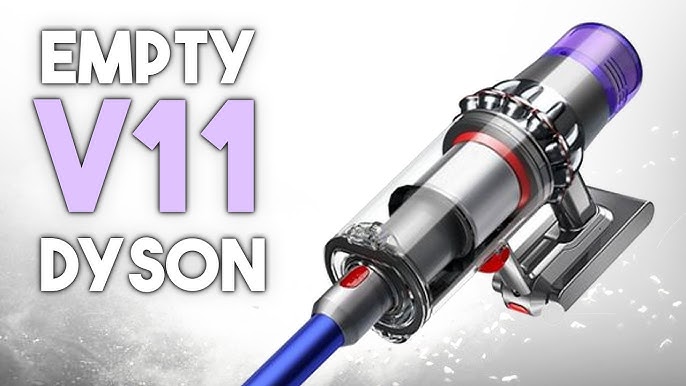
The dust canister is usually a clear, plastic container attached to the main body of your Dyson vacuum. Depending on the model, it can be found near the handle or close to the base of the vacuum. Look for a transparent compartment that collects dust and debris as you clean.
Some models have the canister positioned vertically, while others place it horizontally. You’ll notice a release button or latch nearby—this is your clue that you’ve found the canister. If you’ve ever wondered why you see dust building up in a specific spot, it’s probably right there inside this container.
Understanding Canister Mechanism
Dyson canisters are designed to be user-friendly and easy to remove. Most have a simple push-button or lever that unlocks the container from the vacuum’s body. This mechanism keeps the dust securely inside during use but allows for quick emptying when needed.
Before you press the release, make sure you hold the vacuum over a trash bin. The canister often opens from the bottom or side, letting the dust fall straight out. Have you noticed how some models make it easier to avoid stirring up dust clouds? That’s because of this smart design.
Understanding how the canister opens helps you avoid any spills and keeps cleaning hassle-free. It also ensures you don’t damage the locking parts by forcing it open the wrong way.
Detaching The Dust Canister
Detaching the dust canister from your Dyson vacuum is the first step toward a quick and mess-free emptying process. Knowing how to properly release and remove this part saves time and keeps your hands clean. It also prevents damage to the vacuum, ensuring it works efficiently for longer.
Release The Canister Lock
The canister lock is usually a button or lever located near the handle or base of the dust bin. You need to press or pull this lock to free the canister from the vacuum body.
Try pressing the lock firmly but gently. If it feels stuck, double-check that the vacuum is turned off to avoid any accidental suction or damage. Some Dyson models have a safety mechanism, so it might take a little extra push.
Have you noticed how much easier cleaning is when the lock releases smoothly? If it’s hard to open, it could be time for a quick maintenance check on the latch or hinge.
Remove Canister From Vacuum
Once the lock is released, you can carefully pull the canister away from the vacuum. Hold the canister firmly to avoid dropping it, especially if it’s full of dust and debris.
Some models require a slight twist or tilt to remove the canister completely. Check your vacuum’s design—forcing it straight out can cause unnecessary wear.
Consider where you’ll empty the canister before detaching it. A trash bin with a wide opening works best to avoid spills. Have you ever emptied your vacuum over a small trash can and ended up with dust everywhere? Planning ahead avoids that mess.
Emptying The Canister
Emptying the canister of your Dyson vacuum cleaner is simple and quick. This step keeps your vacuum working well and maintains strong suction. Regular emptying stops dirt buildup and avoids clogging. Follow these easy instructions to clear out the dust and debris safely.
Find An Appropriate Disposal Area
Choose a trash bin with a wide opening. This helps avoid spills when emptying the canister. Avoid places with wind or strong air currents. Dust and debris can scatter easily in such conditions. A kitchen or bathroom trash bin works best. Place some paper or a plastic bag nearby for extra cleanup. This makes the process neat and tidy.
Empty Dust And Debris
Hold the vacuum canister over the trash bin. Press the release button or lever on the canister. The bottom will open, letting dust fall out. Gently tap the sides to loosen stuck debris. Avoid shaking too hard to prevent damage. Close the canister securely after emptying. Check for any remaining dust inside. Wipe the canister clean with a dry cloth if needed. This keeps your vacuum hygienic and ready for use.
Cleaning The Canister
Cleaning the canister of your Dyson vacuum cleaner is important for maintaining its suction power. Dirt and dust build up inside the canister over time. Regular cleaning helps the vacuum work better and last longer. It also prevents odors and blockages. Follow these simple steps to keep your canister clean and clear.
Wipe Down The Canister
Start by detaching the canister from the vacuum. Use a dry cloth to wipe the outside surface. For the inside, use a damp cloth to remove dust and grime. Avoid using harsh chemicals or soaking the canister in water. Let the canister air dry completely before reattaching it. This prevents moisture from damaging the vacuum motor.
Check For Residual Debris
Look inside the canister for any stuck dirt or hair. Use a soft brush or your fingers to remove debris carefully. Pay attention to corners and crevices where dust collects. Check the canister’s release mechanism to ensure it is clear. Removing all leftover debris helps the vacuum maintain strong suction power.
Credit: www.dyson.com.sg
Reattaching The Canister
Reattaching the canister on your Dyson vacuum is simple but requires care. Proper alignment and locking ensure the vacuum works well. Take a moment to check each part before securing the canister back in place.
Align The Canister Properly
Hold the canister near the vacuum body. Match the canister’s grooves with the vacuum’s slots. Make sure the edges line up straight. Avoid forcing the canister into place. A smooth fit means the parts are aligned correctly.
Secure The Canister Lock
Press the canister firmly against the vacuum. Find the lock mechanism on the side or bottom. Push or twist the lock until it clicks. The click shows the canister is secure. Double-check by gently pulling the canister. It should stay firmly attached.
Maintenance Tips
Keeping your Dyson vacuum cleaner in top shape means more than just emptying the bin. Regular maintenance helps your vacuum perform better and last longer. Small, consistent efforts can save you from costly repairs and ensure your cleaning sessions are always effective.
Regular Cleaning Schedule
Set a cleaning routine based on how often you use your vacuum. If you vacuum daily, empty the bin after each use to prevent clogs and maintain suction power. For less frequent use, empty it once it’s about two-thirds full.
Besides emptying the bin, clean the filters every month. Rinse them under cold water and let them dry completely before putting them back. This simple step keeps airflow strong and stops the motor from overheating.
Checking For Damage
Inspect your vacuum regularly for any signs of wear or damage. Look closely at the brush bar for tangled hair or threads that might slow it down. Also, check the hose for cracks or blockages that could reduce suction.
Have you noticed any unusual noises or reduced power during use? These could signal hidden damage or blockages that need your attention. Catching these issues early can prevent bigger problems and expensive fixes.

Credit: www.youtube.com
Frequently Asked Questions
How Do I Safely Empty A Dyson Vacuum Bin?
To safely empty a Dyson vacuum bin, first turn off the vacuum. Hold the bin over a trash can. Press the red release button to open the bin’s bottom flap. Allow debris to fall out fully. Close the bin securely before resuming use.
How Often Should I Empty My Dyson Vacuum?
Empty your Dyson vacuum after every use or when the bin is two-thirds full. Regular emptying maintains suction power and prevents clogging. Frequent emptying also extends your vacuum’s lifespan and improves cleaning efficiency.
Can I Empty A Dyson Vacuum Without Touching Dirt?
Yes, Dyson vacuums feature a hygienic bin emptying system. Press the red lever to release dirt directly into a trash bin. This process avoids contact with dust and debris, keeping your hands clean and reducing allergen exposure.
What If My Dyson Vacuum Bin Won’t Open?
If your Dyson vacuum bin won’t open, check for blockages or debris stuck in the latch. Ensure the vacuum is turned off. Gently press the release button again. If it still won’t open, consult the user manual or contact Dyson support.
Conclusion
Emptying a Dyson vacuum cleaner is quick and simple. Just follow the steps carefully to avoid mess. Regular emptying keeps your vacuum working well. It also helps your home stay clean and fresh. Remember to check the bin often, so dirt does not build up.
Taking a little time to clean your vacuum improves its life. Keep your Dyson ready for the next cleaning job. Easy to do. Worth the effort.

Jaxon Wilder is a tech enthusiast and contributor at ElectroDoz, where he dives into the latest trends in electronics and smart gadgets. With a sharp eye for innovation and hands-on testing, Jaxon brings readers practical reviews, tips, and insights on everything from everyday tech accessories to advanced devices. His goal is to make technology simpler, smarter, and more enjoyable for everyone.