
How Do I Know Which Airpods I Have: Quick Guide
Ever found yourself staring at your AirPods, wondering which model you actually own? You’re not alone.
With Apple’s sleek designs and rapid updates, it can be tricky to tell one version from the next. But knowing exactly which AirPods you have is more than just trivia; it can help you with troubleshooting, understanding features, or even when it’s time for an upgrade.
We’re diving deep to help you identify your AirPods with ease. By the end of this read, you’ll feel empowered with the knowledge to confidently declare, “I know exactly which AirPods I own!” Stay with us, and let’s unravel the mystery together.
Identifying Airpods Model
Identifying your AirPods model is easy. First, check the model number on the case. This number tells you the version. Find it near the hinge. Look for a small text. It usually starts with ‘A’. Next, check the AirPods themselves. Each AirPod also has a model number. Look at the underside of each earpiece. The charging case is also important. Its design hints at the model. Different models have different case sizes.
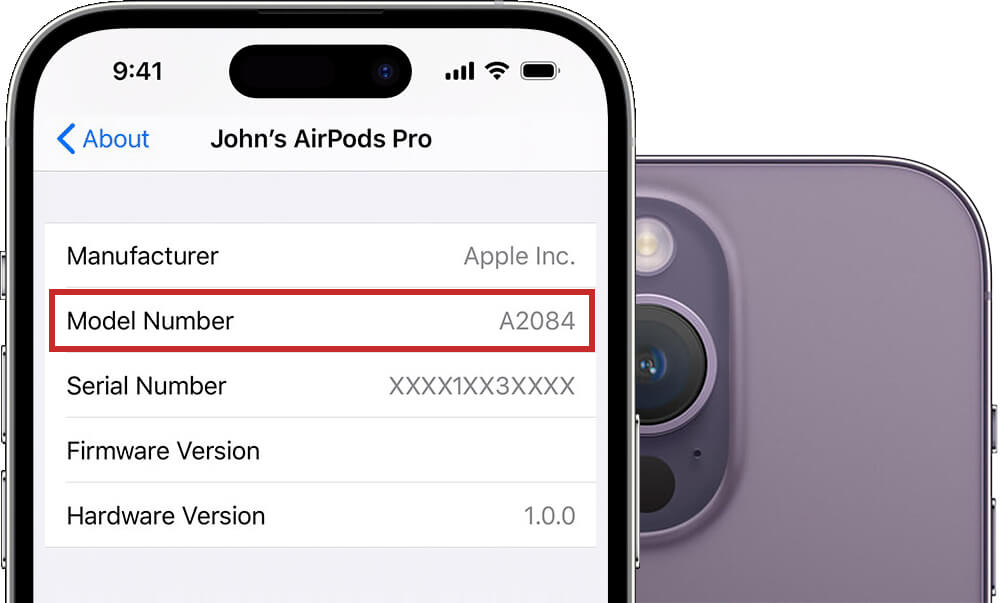
Another way is through your iPhone settings. Connect your AirPods. Go to the Bluetooth menu. Tap on the information icon next to your AirPods. This shows the model name. It’s a simple way to identify them. Knowing your model helps with compatibility. It ensures you use the right accessories. Always keep your AirPods clean. Dust might hide the numbers. Use a soft cloth for cleaning.
Credit: www.howtogeek.com
Checking Model Number
To find out which AirPods you have, check the model number. This is a quick and easy way. Look inside the charging case lid. You will see small numbers. These are important. They tell you the type of AirPods.
Check Apple’s website with the model number. You will know your AirPods type. This helps to know features and updates. Each AirPods has a unique model number. It is important to know it. This helps with any issues you might face.
Examining Physical Features
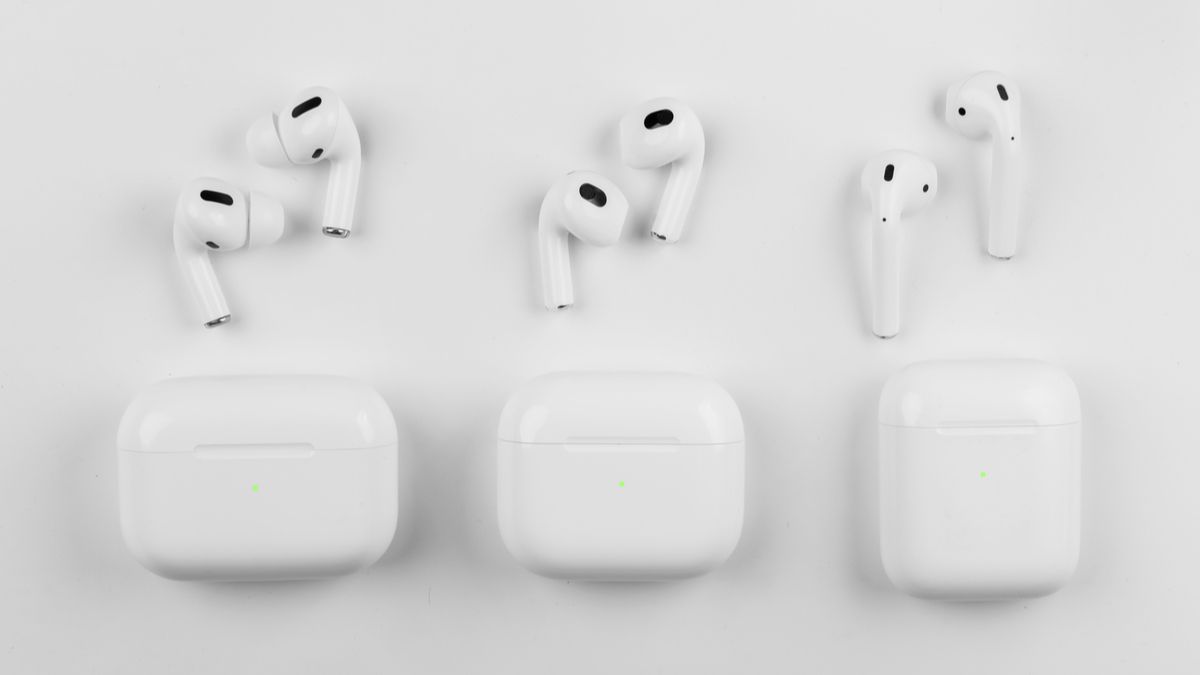
AirPods designs can tell a lot. The first generation has a longer stem. The second generation looks the same but has a better chip inside. AirPods Pro have a much shorter stem. They also have silicone tipsfor comfort.
The case can also help identify your AirPods. The first generation case has a top light. The second generation case has a light on the front. AirPods Pro cases are wider. They also have a wireless charging feature.
Credit: www.bankmycell.com
Using Device Settings
Check your AirPods model using iOS settings. Open the Settings app. Tap on Bluetooth. Locate your AirPods in the list. Tap the small “i” next to your AirPods name. You will see your model number there. This helps you identify which AirPods you own. It’s simple and quick.
Android users can also identify AirPods. Open the Settings app. Navigate to Connections or Bluetooth settings. Locate your AirPods in the paired devices list. Tap on them to see details. The model number will be visible. This reveals which AirPods you own. Easy steps for Android users.
Serial Number Lookup
Find the serial number on your AirPods case. Open the case and look inside the lid. The number is printed there. It’s also on the box they came in. Check near the barcode. You can use your iPhone too. Go to Settings. Tap General. Then tap About. Find the AirPods name and tap it. The serial number will show up. It’s easy to find this way.
Use the Apple website to check your serial number. Visit the site and look for the support section. Enter your serial number there. This tells you which AirPods model you have. It also shows warranty info. Make sure the number is correct. Check it twice if needed. This is a simple way to verify your AirPods model online.

Credit: www.headphonesty.com
Common Features Across Models
All AirPods have a sleek white design. They come in a compact charging case. Each model has a wireless connection. Bluetooth technology is used in every model. AirPods work with Apple devices easily. They all have a simple pairing process. Voice control is available on all models. Siri can be activated for voice commands. Touch controls are present for easy use. Users can play, pause, and skip songs. Calls can be answered with a tap. Noise-cancellation is available in some models. This makes listening clearer. All models have a quick charge feature. A few minutes of charging gives hours of use. Battery life is long-lasting and dependable. The case also holds extra charges. Charging the case keeps AirPods ready.
Troubleshooting Identification Issues
Apple Support can help identify your AirPods. They have special tools. You can call or chat with them. Have your serial number ready. This will make things easier. Apple can guide you step by step. They are always there to help. It is wise to ask experts when unsure. Their advice is reliable and quick.
Community forums are great for help. Many people post questions there. Others share solutions. You might find someone with the same issue. They might have answers. Forums are free to join. Just sign up and start asking. It is a friendly space. People like to help each other. Sharing is caring!
Frequently Asked Questions
How Can I Identify My Airpods Model?
You can identify your AirPods model by checking the model number on the device. Locate it on the underside of each AirPod or on the charging case. Then, compare it with Apple’s official list of AirPods models to determine which version you own.
Where To Find Airpods Model Number?
You can find your AirPods model number on the underside of the charging case lid. Alternatively, check the Settings app on your iPhone. Navigate to Settings > Bluetooth, tap the “i” icon next to your AirPods, and view the model information.
What’s The Difference Between Airpods Models?
The difference between AirPods models lies in design, sound quality, and features. Newer models generally offer improved sound, noise cancellation, and longer battery life. Compare specifications on Apple’s website for a detailed comparison of your AirPods model with others.
Can I Identify Airpods By Their Features?
Yes, you can identify AirPods by features like noise cancellation and spatial audio. Original AirPods lack these features, while newer models offer them. Compare the features listed on Apple’s website with those your AirPods offer to confirm your model.
Conclusion
Identifying your AirPods model is straightforward with the right steps. First, check the model number on the device or packaging. Next, compare features like color and design. Each AirPods version has unique characteristics. Knowing these details helps you understand your device better.
It also assists in troubleshooting and accessory purchases. If you ever face issues, this knowledge is useful. Stay informed about your tech gadgets. This ensures a better user experience. Always refer to Apple’s support for accurate information. Happy listening with your AirPods!

Everett Ashford is an electrical engineer and expert in electronics reviews, tips, and troubleshooting. Specializing in audio and sound devices, including earbuds, AirPods, and headphones, he brings in-depth knowledge and practical advice to help consumers make informed decisions.