How to Enable Noise Cancellation on Airpods: Ultimate Guide
Imagine you’re on a crowded bus, surrounded by chatter and the rumble of the engine. You crave a moment of peace, but noise seems to seep into every corner of your mind.
This is where your AirPods come to the rescue, offering a slice of serenity with their noise cancellation feature. But how do you unlock this magical tool? You might feel a bit overwhelmed by the tech jargon, but don’t worry.
In just a few simple steps, you can transform your listening experience and immerse yourself in the sound you love, free from distractions. Ready to tap into this game-changing feature? Keep reading, and you’ll discover just how easy it is to enable noise cancellation on your AirPods, making every moment sound just right.
Setting Up Noise Cancellation
AirPods need to work with certain devices. Not all devices support noise cancellation. Check if your phone or tablet is compatible. Look in the settings or user manual. Devices must be updated. Older versions may not support the feature. A quick check saves time.
Latest software is needed for noise cancellation. Update your device’s operating system. Check for new updates regularly. Use Wi-Fi for faster updates. Some features only work with updated software. Keep your AirPods updated too. Updates fix bugs and improve sound quality.
Activating Noise Cancellation On Ios
Open your iPhone. Swipe down from the top-right corner. This opens the Control Center. Look for the volume slider. Press and hold it. A new screen will pop up. Here, you will see three options. Tap on the one that says Noise Cancellation. Your AirPods must be in your ears. This helps them work better.
Go to your iPhone’s settings. Find Bluetoothand tap it. Look for your AirPods in the list. Tap on the “i” icon next to them. A menu will appear. Find the Noise Controlsection. Tap it to choose Noise Cancellation. This will keep outside sounds away. Make sure your AirPods are connected. They need to be in your ears for this setting to work.
Activating Noise Cancellation On Mac
Open System Preferences on your Mac. Find the Bluetooth section. Connect your AirPods. Click on Options next to your AirPods. Choose Noise Cancellation. Make sure it is on. This will quiet the background sounds. Simple as that.
Look for the Volume icon in the menu bar. Click on it. Find your AirPods listed. Select Noise Cancellation. Done in seconds! No more noise. Enjoy clear sound.
:max_bytes(150000):strip_icc()/001_turn-on-noise-cancelling-on-airpods-5118496-d2c7d79e360a4fa298959087bd9d301d.jpg)
Credit: www.lifewire.com
Activating Noise Cancellation On Android
Activate noise cancellation on AirPods with Android by opening Bluetooth settings. Connect your AirPods. Then, tap the noise control option to enable it. Enjoy clearer sound.
Third-party App Configuration
Many Android users need a third-party app for noise cancellationwith AirPods. Some apps help connect AirPods to Android phones. These apps make adjusting settings easy. Users can find apps in the Google Play Store. Download and install them to start. Open the app and look for noise cancellationoptions. Follow the steps in the app. Each app might have different instructions. Ensure your AirPods are connected to your phone. Adjust settings to suit your environment. Many apps offer free trials. Try one to see if it works well.
Manual Adjustments
After using apps, manual adjustments might be needed. Check AirPods’ settings on your Android. Some phones have built-in settings. Look for sound or audio options. Adjust these settings manually. Ensure noise cancellationis turned on. Some phones may need software updates. Keep your phone’s software up to date. This helps in better connectivity. Always check AirPods’ battery level. Low battery might affect noise cancellation. Keep AirPods charged for best results.
Troubleshooting Common Issues
Bad sound can ruin your experience. Make sure AirPods are clean. Dirt can block the sound. Check the battery level. Low battery can affect quality. Update the AirPods firmware. Old software can cause problems. Resetting might help. Hold the button on the case until it flashes. Then reconnect to your device.
Sometimes AirPods won’t connect. Ensure Bluetooth is on. Without it, they can’t link. Place AirPods near your device. They need to be close. Restart the device. This can solve many problems. Forget and re-pair the AirPods. Go to settings and select forget. Then, connect again like new.
Credit: www.headphonesty.com
Enhancing Noise Cancellation Experience
AirPods offer a great noise cancellationfeature. You can make it even better. Start by opening your iPhone. Go to the Settingsapp. Tap on Bluetooth. Find your AirPods in the list. Tap the small “i” button next to them. Look for Noise Control. Choose the setting you like. Try different options. Find what suits you best. Some people like full noise cancellation. Others prefer a balance. It’s all about your choice.
- Keep your AirPods clean.
- Update your AirPods firmware.
- Check for a snug fit in your ears.
- Use one earbud for outside awareness.

Credit: support.apple.com
Frequently Asked Questions
How Do I Turn On Airpods Noise Cancellation?
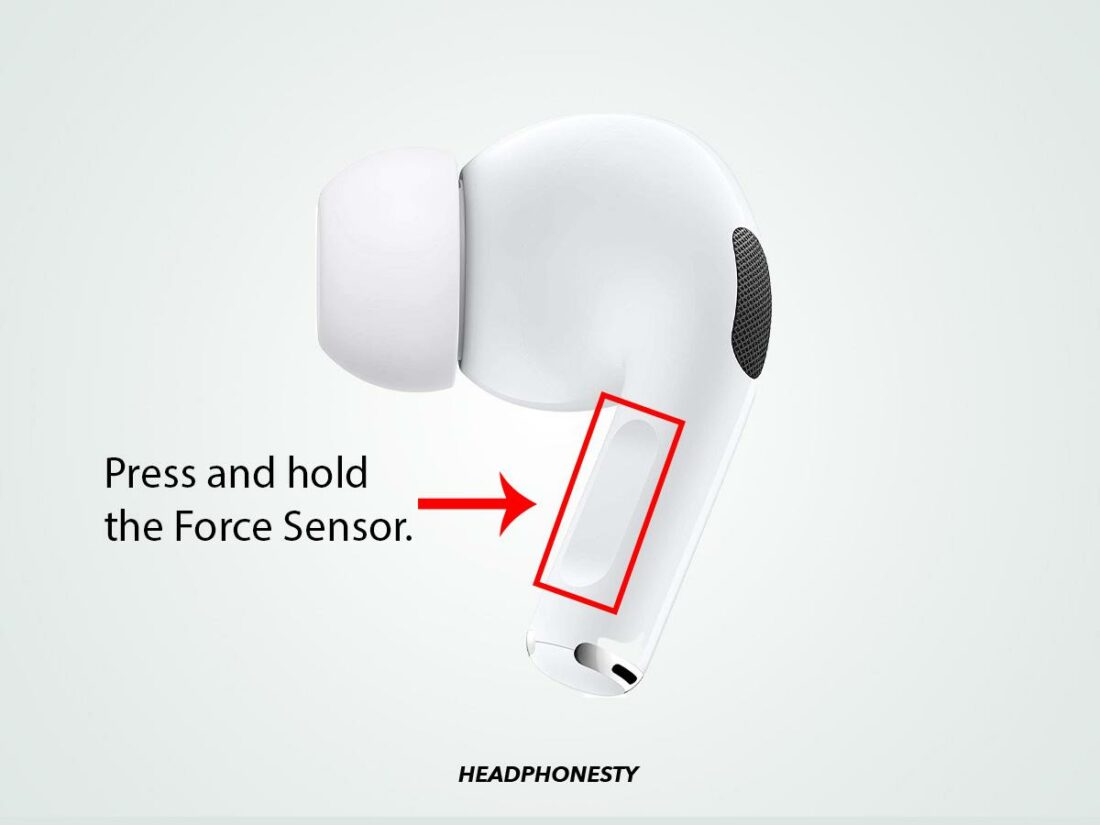
To enable noise cancellation on AirPods, connect them to your device. Open Control Center and press and hold the volume slider. Tap “Noise Cancellation” to activate it. Ensure your AirPods are in-ear and properly positioned for optimal noise reduction.
Do Airpods Pro Have Noise Cancellation?
Yes, AirPods Pro are equipped with active noise cancellation. This feature helps reduce background noise, providing a clearer audio experience. You can toggle noise cancellation through your device’s Control Center or directly on your AirPods Pro.
Can All Airpods Models Cancel Noise?
Not all AirPods models have noise cancellation. Only AirPods Pro and AirPods Max feature active noise cancellation. Regular AirPods provide passive noise isolation, which is less effective at reducing ambient sounds.
Is Noise Cancellation Battery Intensive?
Yes, noise cancellation can impact battery life. AirPods Pro and Max may consume more power when noise cancellation is active. Regularly check battery levels and charge your AirPods to ensure uninterrupted usage.
Conclusion
Activating noise cancellation on AirPods is straightforward. Just follow simple steps. First, ensure your AirPods are connected to your device. Then, open the Control Center. Tap the volume slider and choose “Noise Cancellation. ” This setting helps block background noise for better sound.
Whether commuting or relaxing, it enhances your audio experience. Try it today. Discover a quieter, more focused listening environment. Enjoy your music or calls without distractions. Noise cancellation makes a difference. Enjoy every sound with clarity. Your AirPods offer more than just music.
They bring peace to your ears.

Everett Ashford is an electrical engineer and expert in electronics reviews, tips, and troubleshooting. Specializing in audio and sound devices, including earbuds, AirPods, and headphones, he brings in-depth knowledge and practical advice to help consumers make informed decisions.