
Can I Use VoIP On My Smartphone In Atlanta: Easy Guide
Introduction
Yes. You can use VoIP on a smartphone in Atlanta, Georgia, as long as your phone has internet access through Wi-Fi or mobile data. VoIP lets you make calls through the internet instead of using your carrier’s traditional voice network.
You have two main choices:
- Use your carrier’s built-in Wi-Fi Calling feature.
- Install a VoIP app or use a business phone service.
Both options can work in Atlanta. The best choice depends on whether you need a second number, low-cost international calls, business tools, or a simple way to call when cell coverage is weak. Before replacing your regular phone service, check how the service handles 911 calls, text messages, number portability, and calls during an internet outage.
How VoIP works on a smartphone
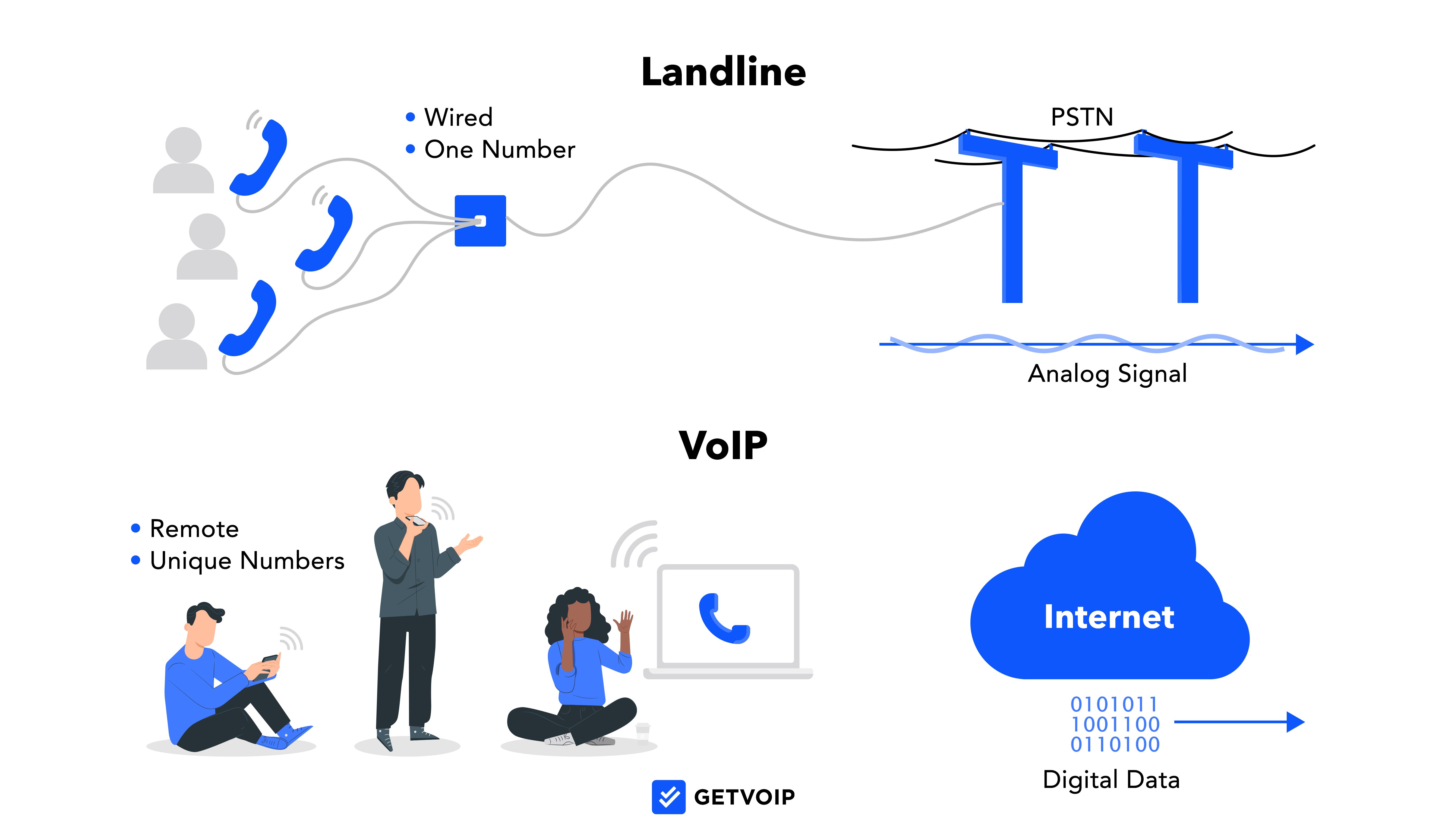
VoIP changes your voice into small data packets. The packets travel over the internet and are changed back into sound at the other end.
On a smartphone, that internet connection usually comes from:
- Home or office Wi-Fi
- Public Wi-Fi
- A 4G LTE or 5G mobile data connection
- A hotspot from another device
The person you call does not always need a VoIP app. Many VoIP services can call normal mobile and landline numbers. Other services work only when both people use the same app.
VoIP app versus carrier Wi-Fi Calling
These services may sound alike, but they are not the same.
| Feature | VoIP app or service | Carrier Wi-Fi Calling |
|---|---|---|
| Phone number | May provide a new number or use a ported number | Usually uses your mobile number |
| Internet source | Wi-Fi or mobile data | Wi-Fi, with carrier support |
| Calls to regular phones | Often available | Usually available |
| Business features | May include auto-attendants, call menus, and recording | Usually limited |
| Text messages | Depends on the app and plan | Usually tied to your mobile service |
| 911 handling | Depends on the provider and registered address | Usually handled through the carrier |
| Main use | Extra line, business line, or lower-cost calls | Better coverage indoors |
Carrier Wi-Fi Calling is often the easiest choice if you want to keep your current number. A separate VoIP app may be better if you need a second Atlanta number, a work line, or calls on several devices.
What you need to use VoIP in Atlanta
You need four basic things:
- A compatible smartphone. Most current iPhones and Android phones support VoIP apps. Carrier Wi-Fi Calling depends on the phone model, software, and wireless plan.
- A reliable internet connection. A weak connection can cause delays, robotic sound, or dropped calls.
- A VoIP app or service. Examples include a consumer calling app, a business phone platform, or your carrier’s Wi-Fi Calling feature.
- A microphone and speaker that work well. A headset can improve sound in busy places such as Hartsfield-Jackson Atlanta International Airport or downtown Atlanta.
You do not need a special VoIP phone. Your smartphone already has the basic hardware. The service and internet connection do most of the work.
How much internet does a VoIP call use?
A voice call often uses far less data than video. The exact amount depends on the app, codec, network, and call quality. As a rough planning estimate, a voice call may use around 0.5 to 1.5 megabytes per minute.
That equals about 30 to 90 MB for one hour of calling. This is an estimate, not a guaranteed amount. Check your app and carrier records if you have a limited mobile data plan.
How to set up VoIP on your smartphone
The setup takes only a few minutes for most apps. Follow the steps below.
Option 1: Install a VoIP app
- Open the Apple App Store or Google Play Store.
- Choose a reputable VoIP provider.
- Check the app’s privacy policy, pricing, text support, and 911 policy.
- Install the app from the official store.
- Create an account and verify your email or mobile number.
- Allow microphone access.
- Allow notifications if you want to receive incoming calls.
- Choose a number if the service offers one.
- Make a test call over Wi-Fi.
- Make a second test call over mobile data.
Test both connections because Wi-Fi and cellular data may perform very differently in your home, office, or travel areas.
Option 2: Turn on carrier Wi-Fi Calling
The menu name varies by phone and carrier.
On many iPhones:
- Open Settings.
- Tap Cellular or Phone.
- Tap Wi-Fi Calling.
- Turn on Wi-Fi Calling on This iPhone.
- Enter or confirm your emergency address if requested.
On many Android phones:
- Open Settings.
- Tap Network & internet, Connections, or a similar menu.
- Look for Wi-Fi Calling.
- Turn it on.
- Follow the carrier’s prompts for emergency-location information.
If you cannot find the feature, your carrier, phone model, software version, or plan may not support it. Contact the carrier before downloading another app.
Signs that setup worked
Look for one or more of these signs:
- The app shows you as online or registered.
- The phone displays a Wi-Fi Calling label.
- A test call connects without using normal cellular voice service.
- The caller ID shows the number you selected.
- Incoming calls ring while the phone is connected to Wi-Fi.
Do not assume that an app is working just because it installed. Make a test call and confirm that the other person can hear you clearly.
Is VoIP reliable in Atlanta?
VoIP can be reliable in Atlanta, but its performance depends more on the internet connection than on the city itself. A strong connection at your home or workplace may provide clear calls. A crowded public network, weak apartment Wi-Fi, or overloaded mobile data connection may not.
Atlanta users should consider several local conditions:
- Tall buildings can affect indoor mobile coverage.
- Large events can put pressure on local networks.
- Storms can interrupt power or internet service.
- Public Wi-Fi may block voice traffic or require repeated logins.
- Traffic and travel can move your phone between Wi-Fi and mobile data.
Simple quality checks
Before choosing VoIP as your main line, check these items:
| Check | What to look for |
|---|---|
| Delay | The other person should hear you without a long pause |
| Jitter | Speech should not sound uneven or broken |
| Packet loss | Words should not disappear |
| Upload speed | The connection must send your voice clearly |
| Download speed | The connection must receive the other person’s voice |
| Stability | The call should remain connected for at least 10–15 minutes |
You do not need the fastest internet plan. Stable service is usually more useful than a high advertised speed.
If calls sound robotic, move closer to the Wi-Fi router, stop large downloads, or switch to mobile data. If calls drop when you leave Wi-Fi, check whether the app supports handoff between networks.

Can VoIP call 911 in Atlanta?
Sometimes, but you must verify the exact service before relying on it for emergencies.
The Federal Communications Commission requires interconnected VoIP providers to support 911 access under certain conditions. These providers generally must explain their 911 limits, obtain a service address, and route emergency calls through the appropriate emergency system.
However, not every calling app is an interconnected VoIP service. Some apps support app-to-app calls only. Others may offer limited emergency calling or no 911 access at all.
Register your physical address
If your VoIP service supports 911, enter the address where you will use the service. For an Atlanta address, include the correct:
- Street number
- Street name
- Apartment or unit number
- City
- State
- ZIP Code
Do not assume that an Atlanta phone number tells emergency dispatchers where you are. A phone number with an Atlanta area code does not automatically provide your current location.
If you move from one Atlanta-area address to another, update the emergency address. Also update it if you take the service to another state.
Understand the limits
VoIP 911 service may have limits during:
- Internet outages
- Power failures
- Account suspension
- Network congestion
- Incorrect address registration
- Device battery failure
- Service moves before the new address is verified
Keep a charged mobile phone available for emergencies. If you call 911 through VoIP, state your location and callback number first. If the call disconnects, call back.
For official details, review the FCC’s guidance on VoIP and 911 service at fcc.gov.

Can I keep my Atlanta phone number?
Often, yes. Many VoIP providers support local number porting. You may be able to move a number with an Atlanta area code, such as 404, 470, 678, or 770, to a VoIP service.
Porting is not always instant. The provider may ask for:
- Your current account number
- The account billing name
- Your service address
- A recent phone bill
- A porting authorization
- A temporary account PIN
Do not cancel your current mobile or landline service before the port finishes. Canceling early can cause the number to be lost or delay the transfer.
A VoIP provider may also offer a new local number. That can be useful for a business line, but check whether the number is truly local to your desired area and whether text messaging is included.
How much does smartphone VoIP cost?
The cost depends on the type of service.
| Service type | Common cost pattern | Best for |
|---|---|---|
| Carrier Wi-Fi Calling | Usually included with an eligible mobile plan | Keeping your current number |
| Free app-to-app calling | Often free between users | Calling friends who use the same app |
| Consumer VoIP number | Monthly fee or paid credits | A second number |
| Business VoIP | Monthly fee per user, often with features | Teams and customer calls |
| International calling | Per-minute charges or an add-on plan | Calls outside the United States |
Read the full pricing terms. A low monthly price may not include 911 access, text messages, number porting, call recording, or calls to certain destinations.
Also consider your mobile data plan. Wi-Fi calls may not use much cellular data, but calls over 4G or 5G can count toward your monthly allowance.

Common VoIP problems and fixes
The call sounds choppy
Likely causes: Weak Wi-Fi, network congestion, or poor mobile data coverage.
Try this:
- Move closer to the router.
- Pause streaming and large downloads.
- Switch between Wi-Fi and mobile data.
- Close other apps that use the microphone.
- Restart the app and test again.
Calls do not ring when the app is closed
Likely causes: Notifications are blocked, background use is restricted, or the account is offline.
Try this:
- Enable notifications.
- Allow background activity.
- Check battery-saving settings.
- Sign out and back in.
- Confirm that the service supports incoming calls when the app is not open.
The caller ID is wrong
Likely causes: The app is using a default number, a verified number, or a business caller ID setting.
Try this:
- Open the service’s caller ID settings.
- Verify the number.
- Check whether the recipient’s carrier is filtering the call.
- Ask the provider whether business caller ID is supported.
Caller ID can be spoofed by bad actors. Do not trust a familiar number by itself. Confirm unexpected requests through a known channel.
Text messages do not work
A VoIP number may not receive every type of text. Some banks, social networks, and security services block VoIP numbers for one-time codes. If you need account verification, keep a standard mobile number available.
911 does not work
Stop and check the provider’s emergency-calling policy. Confirm the registered address and account status. If you have an immediate emergency, use a mobile phone or another available phone to call 911 and provide your location.
Is VoIP safe and private?
VoIP can use encryption, but privacy depends on the provider, app, device, and network. Public Wi-Fi creates more risk than a trusted home network, especially if the network is fake or poorly secured.
Use these basic safeguards:
- Download apps only from official app stores.
- Use a strong, unique account password.
- Turn on multifactor authentication when available.
- Keep your phone and app updated.
- Avoid sensitive calls on unknown public Wi-Fi.
- Review microphone, contacts, and notification permissions.
- Do not share verification codes with callers.
- Check how the provider stores call data and recordings.
Call recording may require consent under federal or state law. Georgia generally permits recording when one party consents, but calls involving people in other states can raise different legal issues. If recording business or personal calls, obtain legal advice for your situation.

Which VoIP option is right for you?
Choose based on your main goal.
- You want better indoor coverage: Start with carrier Wi-Fi Calling.
- You want a separate personal number: Consider a consumer VoIP app.
- You want a work number on your smartphone: Use a business VoIP service.
- You make frequent international calls: Compare per-minute rates and country coverage.
- You need dependable emergency calling: Keep a carrier mobile line and verify the VoIP provider’s 911 terms.
- You have weak home internet: Fix the connection before making VoIP your main line.
A practical approach is to test VoIP as a secondary line for one billing cycle. Make calls from home, work, and outside. Test Wi-Fi, mobile data, incoming calls, text messages, caller ID, and emergency-address setup before moving your main number.

Key takeaways
- You can use VoIP on an iPhone or Android phone in Atlanta.
- VoIP works through Wi-Fi or mobile data.
- Carrier Wi-Fi Calling is different from a separate VoIP app.
- Call quality depends on connection stability.
- Check 911 support and register your physical address.
- Do not cancel your current service until number porting is complete.
- Keep a backup way to call during power or internet outages.
FAQs
Can I use VoIP without a SIM card?
Yes, many VoIP apps work over Wi-Fi without an active SIM card. The phone still needs Wi-Fi, and some services require account verification by email or phone. Emergency calling may not work the same way, so do not treat a Wi-Fi-only device as your only emergency phone.
Can I use a VoIP number for business in Atlanta?
Yes. A business VoIP service can provide a local number and tools such as auto-attendants, voicemail-to-email, call menus, and multiple users. Check its 911 policy, text support, number porting rules, and recording features before signing up.
Does VoIP work when I leave Atlanta?
Usually, yes. A VoIP app can work anywhere in the United States with a compatible internet connection. Your registered 911 address does not automatically follow your location, so update it when you move the service or use a provider that supports location changes.
Can I use VoIP while traveling outside the United States?
Many apps work abroad over Wi-Fi. Mobile data roaming charges may apply if you use cellular data. Calls to U.S. numbers may work normally, but emergency access and local emergency numbers can vary by country.
Will VoIP replace my regular cell phone service?
It can for some people, but the decision depends on emergency access, internet reliability, text-message needs, and mobile coverage. A separate VoIP app is often safer as a second line until you have tested it in the places where you make calls.
Conclusion
You can use VoIP on your smartphone in Atlanta with Wi-Fi or mobile data. For the simplest setup, try your carrier’s Wi-Fi Calling feature. For a second number or business tools, install a VoIP app or choose a hosted phone service.
Before making the switch, test call quality, confirm text support, check number-porting rules, and verify how 911 calls are handled. Keep a charged mobile phone available when power or internet service may fail.

Everett Calloway is a consumer electronics writer and technology enthusiast at ElectroDoz. He enjoys exploring the latest gadgets, electronic devices, and innovative technologies that make everyday life easier. Everett focuses on creating helpful product reviews, detailed buying guides, practical how-to articles, and troubleshooting tips. His goal is to simplify complex technical information and help readers understand product features, compare their options, and make informed purchasing decisions. When he isn’t researching new electronics, he enjoys exploring emerging technology trends and discovering useful gadgets.