
How Does a Sound Bar Connect to the Tv: Easy Guide
Are you tired of your TV’s built-in speakers delivering lackluster sound? You’re not alone.
Many people are turning to sound bars to enhance their home entertainment experience. But how does a sound bar connect to your TV? This question might seem daunting if you’re not tech-savvy, but don’t worry. This guide will walk you through the process step by step, demystifying any technical jargon along the way.
Imagine transforming your living room into a mini-theater, where every dialogue is crisp and every explosion feels like it’s happening right there. Curious to learn how to achieve this audio magic? Keep reading to discover the simple steps to connect a sound bar to your TV, and elevate your viewing experience to a whole new level.
Credit: www.youtube.com
Types Of Sound Bar Connections
HDMI is a popular way to connect a sound bar. It sends clear sound and video signals. You need an HDMI cable for this. Plug one end into the TV. The other end goes into the sound bar. This simple connection gives great sound.
Optical cables use light to send sound. They are thin and light. Connect one end to the TV. The other end goes into the sound bar. Optical cables give clear sound without noise. Many people choose this for better sound quality.
Bluetooth is wireless. No cables needed. Turn on Bluetooth on the TV. Do the same on the sound bar. Pair them together. Bluetooth is easy to use. It works well for short distances. Sound is good, but sometimes there is a delay.
RCA cables have red and white plugs. They are old but still used. Plug the red and white ends into the TV. Do the same on the sound bar. Sound quality is okay. RCA is simple but not the best for modern TVs.
Setting Up Hdmi Connection
Check if your TV has an HDMI ARCport. This port is important. It lets the TV and sound bar talk. Look at the back of your TV. See if it says ARCnext to the HDMI port. If it does, your TV is compatible.
Turn on your TV and sound bar. Go to the settings menuon your TV. Look for audio settings. Change the audio output to HDMI. Now, go to the sound bar’s settings. Select the HDMI input. This tells the sound bar to use the HDMI connection.
Using Optical Cable
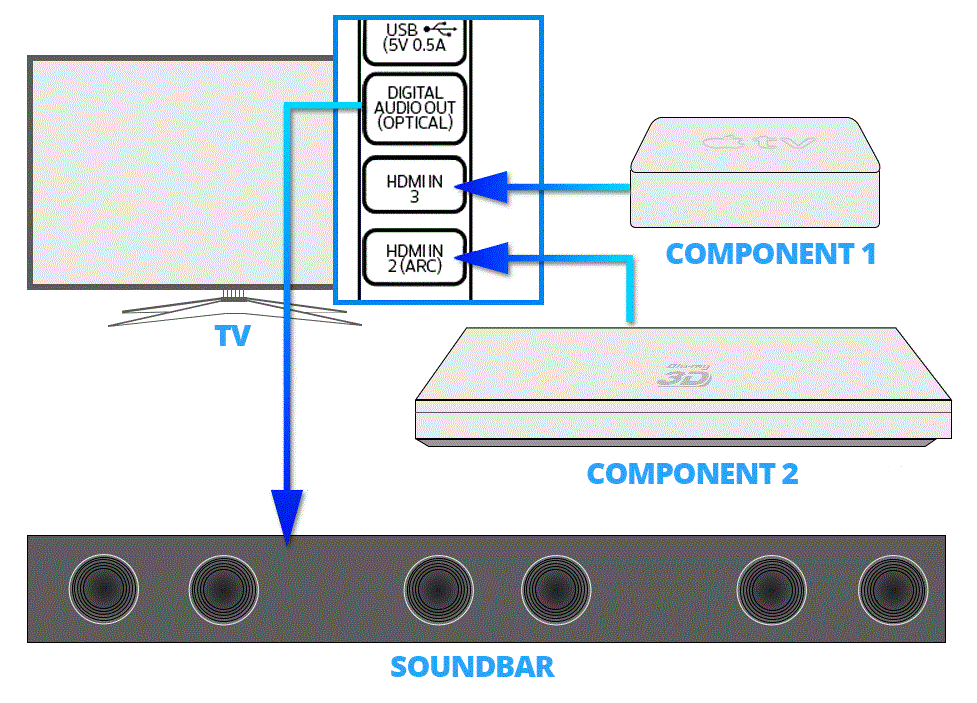
Sound bars often use optical cables for clear sound. Locate the optical port on your TV. It usually looks like a small square hole. Find the same port on your sound bar. Insert one end of the cable into the TV port. Insert the other end into the sound bar port. Ensure the cable is securely connected. This helps in providing better sound quality.
After connecting the cable, adjust the audio settings. Go to your TV’s audio menu. Choose the optical output option. This directs sound to the sound bar. Check if the sound bar is on. You should hear sound now. Adjust the volume on both devices. Make sure the sound is balanced. If sound is not clear, check the cable connections again.
Credit: www.crutchfield.com
Bluetooth Pairing Process
Sound bars connect to TVs through Bluetooth pairing. Start by turning on both devices. Select the sound bar from the TV’s Bluetooth settings. Ensure both are in pairing mode for a successful connection. Enjoy enhanced audio without the hassle of wires.
Enabling Bluetooth On Tv
First, find the Bluetooth settingson your TV. Use the remote to open the settings menu. Look for Bluetooth options. Turn on Bluetooth. Make sure your TV is ready to pair.
Pairing The Sound Bar
Turn on the sound bar. Find the Bluetooth buttonon the sound bar or remote. Press the button to start pairing. The sound bar will search for devices. The TV should find the sound bar. Select the sound bar from the list on the TV. Wait for the pairing to complete. Once paired, sound will come from the sound bar.
Rca Cable Setup
RCA ports are usually found at the back of the TV. They are colored red, white, and yellow. Look for labels like “Audio Out” or “Video Out”. These labels help in finding the right ports. Older TVs often have these ports. Modern TVs might have them too. It’s important to check your TV model. Not all TVs have RCA ports.
Connect the red cable to the red port. The white cable goes into the white port. If using video, connect the yellow cable. Match each cable with its port color. This ensures proper connection. Once connected, check the sound bar. It should show a connection signal. If not, double-check the cable positions. Make sure each cable is firmly plugged. Loose cables can cause issues. Turn on your TV and sound bar. Test the sound to ensure it’s working.
Troubleshooting Common Issues
Check if the sound bar is turned on. Ensure the volume is up. Confirm the cables are connected tightly. Use the remote to switch input modes. Sometimes, the TV might need a restart. If still no sound, try a different cable. This can fix the issue.
Move other electronics away from the sound bar. Devices like phones can cause interference. Place the sound bar and TV closer. This helps the signal stay strong. Try using a wired connection. It is often more stable than wireless. Keep the room free of clutter. It helps with better sound and connection.
Enhancing Sound Bar Performance
Connecting a sound bar to the TV boosts audio clarity. Use HDMI ARC or optical cables for seamless integration. Proper setup ensures immersive sound experiences during movie nights and gaming sessions.
Positioning Tips
To get the best sound, place the sound bar at ear level. This helps you hear sounds clearly. Avoid putting it inside a cabinet. This can block the sound. Keep it close to the TV for better sound matching. Walls can reflect sound. So, try to keep the sound bar a little away from walls. This prevents echoes.
Sound Mode Adjustments
Many sound bars have different sound modes. Choose the right one for the content. For movies, select movie mode for loud sounds and effects. While watching TV shows, use dialogue mode. It makes voices clearer. Music mode is great for songs. This mode enhances the music’s quality. Always check the manual. It explains each mode.
Credit: www.sony.co.uk
Frequently Asked Questions
How Do I Connect A Sound Bar To My Tv?
To connect a sound bar to your TV, use an HDMI ARC or optical cable. Ensure both devices are turned off during connection. Once connected, select the appropriate input source on your TV. This setup generally provides the best sound quality and integration between devices.
Can I Use Bluetooth To Connect My Sound Bar?
Yes, many sound bars support Bluetooth connections. Turn on Bluetooth on both the TV and sound bar. Pair the devices by selecting the sound bar in your TV’s Bluetooth settings. This method is wireless, offering flexibility, but it may not match wired connections in audio quality.
What Cables Are Needed For Sound Bar Connection?
The most common cables are HDMI ARC and optical cables. HDMI ARC provides better integration and supports more audio formats. Optical cables are a good alternative if HDMI ARC is unavailable. Both cables transmit high-quality audio, enhancing your viewing experience.
Is Hdmi Arc Better Than Optical For Sound Bars?
Yes, HDMI ARC is generally better due to its ability to support more audio formats. It also allows for better control integration between devices. Optical is a reliable alternative but lacks some features available with HDMI ARC, such as volume control via the TV remote.
Conclusion
Connecting a sound bar to your TV enhances your audio experience. It’s straightforward. Use HDMI, optical cable, or Bluetooth for connection. Check your TV and sound bar compatibility first. Follow the instructions provided with your devices. Sound bars improve sound quality and clarity.
They bring your favorite shows and movies to life. Enjoy more immersive sound in your living room. So, get ready for better sound and easy setup. Your TV and sound bar work together to create an enjoyable viewing experience. Make sure to explore the options available for your home setup.

Everett Ashford is an electrical engineer and expert in electronics reviews, tips, and troubleshooting. Specializing in audio and sound devices, including earbuds, AirPods, and headphones, he brings in-depth knowledge and practical advice to help consumers make informed decisions.