How to Check Temperature on Oura Ring: Easy Guide
Ever wondered how to check the temperature on your Oura Ring? You’re in the right place.
Your Oura Ring is more than just a sleek accessory; it’s a powerful tool that keeps track of your health. Knowing how to monitor your body temperature with it can give you valuable insights into your well-being, helping you take charge of your health like never before.
Imagine having the ability to notice changes in your body’s temperature patterns, allowing you to spot potential health issues early or optimize your daily routine for better performance. This isn’t just about numbers; it’s about understanding what your body needs. Stay with us as we break down the simple steps to check your temperature on the Oura Ring. We’ll ensure you feel confident and empowered to make the most out of this innovative technology. Keep reading to discover how to unlock this hidden feature and transform your health tracking experience.
What Is The Oura Ring?
The Oura Ring is a smart ring that tracks your health. It looks like a normal ring but is packed with sensors. These sensors gather data about your body. It helps you understand your sleep patterns, activity levels, and overall well-being.
You wear it on your finger all day. It is lightweight and comfortable. Many people use it to improve their health. The ring sends information to an app on your phone. You can see daily updates and trends over time. The Oura Ring is a tool to help you live a healthier life.
Features Of The Oura Ring
The Oura Ring is great for tracking sleep. It checks how long you sleep. It also measures how well you sleep. You can see your sleep patterns. This helps in improving your sleep. It shows when you are in deep sleep. And when you are not.
Oura Ring tracks your daily activities. It counts your steps. It also checks your heart rate. You can know how active you are. This helps you stay fit. You can set goals. Then, try to reach them every day.
The ring can sense your body temperature. It shows if your body gets too hot. Or if it’s too cold. Knowing your temperature is important. It helps you stay healthy. Oura Ring makes this easy.
Why Monitor Temperature?
Keeping an eye on your body’s temperature is important. It helps you understand your health better. Changes in temperature can signal illness. Fever often means you might be sick. Regular checks can spot changes early. This might help you prevent getting worse. Oura Ring tracks your temperature daily. It provides useful insights for health. Monitoring helps you stay aware of your body’s condition.
Temperature changes can also affect sleep. A cool body helps you sleep better. Knowing your temperature trends can improve your routine. It guides you on how to adjust your bedroom environment. This can lead to more restful nights. Better sleep means more energy during the day. Monitoring temperature is a simple way to enhance your well-being.
Accessing Temperature Data
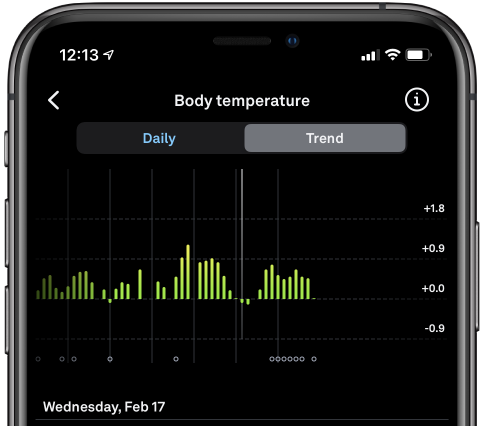
The Oura App helps see your temperature dataeasily. Open the app on your phone. Tap on the Readiness tab. This tab shows daily body changes. Look for the temperature trendsection. It shows if your temperature is higher or lower than usual. Data updates every day. Make sure your phone is connected to the internet. This ensures the app shows correct data.
Syncing keeps your ring connected to the app. Make sure the ring is charged. Open the app on your phone. Your ring should be close to your phone. Tap the sync button in the app. Wait a few seconds. Check if the ring is synced. Successful sync shows updated temperature data. This helps you know your body’s condition.
Interpreting Temperature Readings
The Oura Ring measures your body’s baseline temperature. This is the average temperature when you are at rest. Knowing your baseline helps understand changes. It’s like a personal thermometer.
Baseline temperature varies by person. Tracking it daily gives useful insights. Pay attention to sudden shifts. They might signal changes in health. Consistency is key for accuracy.
Temperature changes can show health changes. Variations might mean stress or illness. Notice any unusual patterns. Check readings regularly. A sudden increase may need attention. Sometimes even small changes matter.
The ring helps you spot trends. Use the data to stay healthy. Monitoring changes keeps you informed. It’s like a health guide on your finger.
Credit: ouraring.com
Troubleshooting Common Issues
Oura Ring might have trouble syncing sometimes. First, ensure your phone’s Bluetooth is on. Next, check if your app is updated. Restarting the app can help too. If problems continue, restart your phone. Make sure the ring is close to your phone. This can solve many issues.
Data might not be accurate every time. Clean the sensors of your ring often. Make sure the ring fits snugly on your finger. Loose rings can cause wrong readings. Try wearing it on different fingers. This can improve data quality. Always check the app for updates. Updates can fix many data issues.
Tips For Accurate Temperature Tracking
Wear your Oura Ringevery day. It helps track temperature better. Avoid taking it off often. Consistency is key for accuracy. Sleep with it on each night. This keeps your temperature data steady. Ensure the ring fits snugly. A loose ring gives wrong readings.
Keep the Oura app updated. Updates fix bugs and improve features. Check your app store for updates. Set your phone to auto-update apps. An updated app gives the best temperature tracking. Always sync your ring with the app. This ensures your data is current.
Credit: support.ouraring.com
Credit: www.reddit.com
Frequently Asked Questions
How Do I Check Temperature On Oura Ring?
To check temperature on your Oura Ring, open the Oura app on your smartphone. Navigate to the “Readiness” tab. Here, you’ll find your temperature trends displayed. The Oura Ring measures deviations from your baseline temperature, helping you monitor changes in your body’s condition effectively.
Can Oura Ring Detect Fever?
The Oura Ring can help detect fever by showing temperature deviations from your baseline. While it doesn’t diagnose illness, tracking temperature trends can indicate potential health issues. Regular monitoring can alert you to unusual changes, prompting further investigation or medical advice.
Is Oura Ring Temperature Accurate?
Oura Ring provides accurate temperature trends based on deviations from your baseline. It measures changes, not absolute temperature. While not a medical thermometer, it’s reliable for tracking temperature variations over time, helping you notice unusual patterns that might require attention.
Does Oura Ring Show Real-time Temperature?
Oura Ring does not show real-time temperature readings. It tracks temperature variations overnight and displays trends in the app. This helps you understand how your temperature changes over time, which is valuable for monitoring your health and readiness.
Conclusion
Checking temperature on your Oura Ring is simple and useful. Follow the steps outlined in this guide for accurate readings. Regular temperature monitoring helps in understanding your body’s patterns. It assists in tracking health changes over time. Always ensure your ring fits well for best results.
Remember, consistent usage provides more reliable data. Stay informed about your body’s signals. A healthy lifestyle begins with awareness. Use this tool to enhance your well-being. It’s a helpful addition to your daily routine. Happy tracking with your Oura Ring!

Finnian Delaney is a seasoned writer and editor specializing in technology and electronics. At ElectroDoz, he covers a wide range of topics, with a focus on MacBooks, laptops, fitness trackers, keyboards, and computer hardware. With a knack for making complex tech accessible, Finnian helps readers stay informed and confident when choosing their next device or upgrade.