How Does Japanese Keyboard Work: Unveiling the Secrets
Have you ever wondered how Japanese keyboards work? If you’ve ever attempted to type in Japanese, you might have found it both fascinating and puzzling.
The combination of different characters, the unique structure of the language, and the seamless transition between hiragana, katakana, and kanji can seem like a mystery. But what if I told you that understanding how a Japanese keyboard functions could unlock new levels of efficiency and creativity for you?
Imagine typing with ease, expressing your thoughts fluently, and even impressing your friends with your newfound skills. Dive into this article, and by the end, you’ll not only have a clear understanding of the Japanese keyboard but also feel empowered to use it like a pro. Are you ready to demystify this intriguing tool? Let’s get started!
Japanese Keyboard Layout
Japanese keyboards have special keys. These keys are for Hiraganaand Katakana. Hiragana is used for words and endings. Katakana is for foreign words and names. Each key can make different sounds. Users switch between Hiragana and Katakana easily. Typing is fast and fun this way.
Kanji is a big part of Japanese. It has many characters. Typing Kanji needs special steps. First, type in Hiragana. Then, a list of Kanji will show. Pick the right one. This makes typing Kanji easy. It helps with writing complex words.
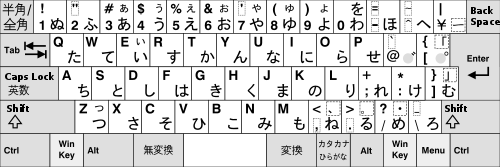
Credit: en.wikipedia.org
Typing In Japanese
The Romaji method lets you type Japanese using English letters. It’s like typing in English, then the computer converts it. For example, typing “sushi” gives you the Japanese characters for sushi. This is easy for English speakers to learn. It’s especially useful for beginners. They don’t need to learn all the Japanese characters first.
The Kana method uses Japanese letters directly. It’s faster for those who know these letters. You press one key for each sound. This method is used by native speakers. It helps them type quickly. It requires knowing the Japanese syllabary.
Many software tools help type Japanese. They offer suggestions as you type. Examples include Microsoft IME and Google IME. These tools are free and easy to install. They work on most computers and phones. They help make typing in Japanese smoother.
Conversion To Kanji
Japanese keyboards use predictive text algorithms. These help in converting Hiragana to Kanji. Users type in Hiragana. The keyboard suggests possible Kanji matches. This saves time and effort. It makes typing faster and easier.
Users can customize their dictionary. This helps in adding new words and phrases. Personal names or specific terms can be included. These customizations make typing more personal. It improves typing efficiency for everyone.
Keyboard Shortcuts And Features
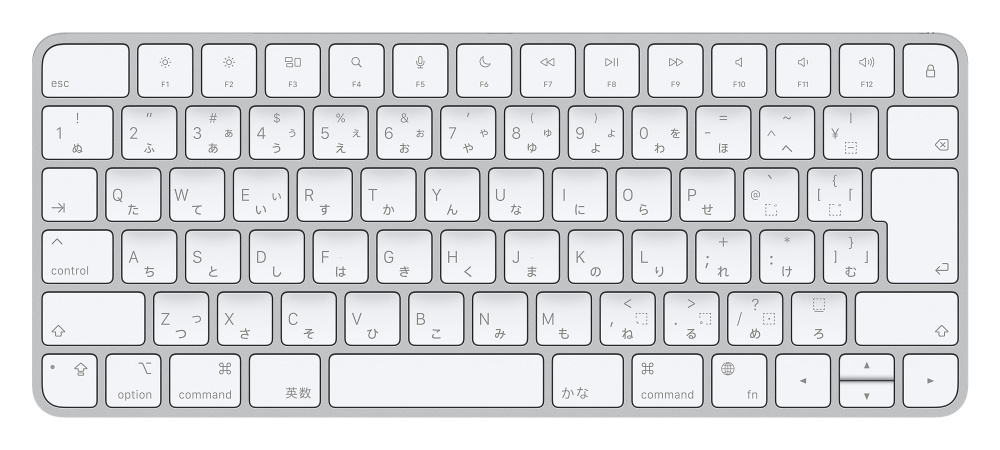
Japanese keyboards have special keys. These keys help type faster. Efficiency tools on these keyboards save time. Users can switch between languages quickly. This is useful for those who type in both Japanese and English. Predictive text is another tool. It suggests words as you type. This helps avoid mistakes. Some keys also serve multiple functions. This makes typing more efficient.
Japanese keyboards make it easy to type special characters. Hiragana, Katakana, and Kanji are common. These are special Japanese scripts. A key allows you to change these scripts. Symbols like currency signs are also easy to find. This helps with writing numbers and prices. Typing special characters is simple and fast. Each key has a dual purpose. This makes it easy to type many characters.
Challenges And Tips
Navigating the complexities of a Japanese keyboard involves understanding different input methods like Hiragana, Katakana, and Kanji. Users often face challenges with character selection and typing speed. Practice regularly and utilize language settings to enhance efficiency and comfort while typing in Japanese.
Common Mistakes
Typing in Japanese can be tricky. Many beginners choose the wrong keyboard layout. This leads to confusion. Sometimes, they mix up hiraganaand katakana. Another mistake is not understanding kanji. Kanji can change the meaning. It’s important to learn the right keystrokes. Practice helps avoid these mistakes.
Improving Typing Speed
Speed comes with practice. Start with easy words. Focus on accuracyfirst. Use typing games to improve. They make learning fun. Track your progress over time. Set small goals each day. Celebrate when you reach them. Your speed will improve slowly. Remember, patience is key.
Credit: japan-dev.com
Future Of Japanese Keyboards
Japanese keyboards are getting smarter. They now use advanced technology. This helps people type faster and better. New keyboards can predict what you want to type next. They learn from your typing habits. This makes typing easy and fun.
AI is becoming part of keyboards. It helps with word suggestions. This makes typing quick and correct. AI also helps with voice typing. Speak into the keyboard, and it types for you. This is very helpful for everyone. Especially for those who type a lot every day.

Credit: www.youtube.com
Frequently Asked Questions
How Do Japanese Keyboards Differ From English Ones?
Japanese keyboards feature additional keys for kana input and special symbols. They have a smaller space bar and extra keys for switching between character sets. This layout supports efficient typing in both Japanese and English, accommodating the unique requirements of the Japanese language.
What Is Kana Input On Japanese Keyboards?
Kana input allows typing using Japanese syllabary characters directly. Each key corresponds to a specific kana. This method is faster for native speakers, as it eliminates the need to convert from romaji. Kana input is beneficial for those familiar with the phonetic sounds of each character.
How Do You Switch Between Input Methods?
Japanese keyboards have dedicated keys to toggle input methods. Users can switch between kana, romaji, and English with ease. This flexibility enhances typing efficiency for bilingual users. These keys are often labeled for quick reference, making transitions smooth and intuitive.
Can You Type English On A Japanese Keyboard?
Yes, Japanese keyboards support English typing seamlessly. Users can switch to the English input mode via dedicated keys. The keyboard layout is similar to QWERTY, ensuring familiarity. This functionality is essential for bilingual users and those working in international settings.
Conclusion
Japanese keyboards offer a unique typing experience. Easy to use, even for beginners. Switch between English and Japanese quickly. Useful for those learning the language. Efficient for typing complex characters. Saves time and effort. Technology blends traditional and modern elements seamlessly.
Great for communication across cultures. Enhances productivity in multilingual settings. Understand the basics to improve your typing speed. Dive into the world of Japanese keyboards. Discover new ways to express yourself. Whether for work or fun, this tool is versatile.
Perfect for anyone interested in Japanese culture.

Finnian Delaney is a seasoned writer and editor specializing in technology and electronics. At ElectroDoz, he covers a wide range of topics, with a focus on MacBooks, laptops, fitness trackers, keyboards, and computer hardware. With a knack for making complex tech accessible, Finnian helps readers stay informed and confident when choosing their next device or upgrade.