How Do You Charge a Smartwatch: Easy Step-by-Step Guide
Imagine this: You’re about to step out for a brisk morning walk, and you glance at your wrist only to find your smartwatch battery hovering at a dreaded 1%. Panic sets in.
How did this happen? More importantly, how can you ensure it doesn’t happen again? Charging your smartwatch might seem straightforward, but there’s more to it than just plugging it in. You might be unknowingly making small mistakes that can affect your smartwatch’s battery life and performance.
In this guide, we’ll dive into the essential steps and tips for charging your smartwatch efficiently. Keep reading to discover how to keep your device powered up and ready to go whenever you need it. Your active lifestyle deserves a watch that’s always ready to keep pace with you.
Preparing Your Smartwatch
Always check the battery levelon your smartwatch. This helps to know if it needs charging. Some smartwatches show a battery icon on the screen. Others might use an app on your phone. Ensure the battery is not too low. Charging when it’s low can keep your watch running well.
Find the charging porton your smartwatch. It’s usually on the back or side. Some models have a magnetic charging area. Check your watch’s manual if unsure. Make sure the port is clean. Dust can block the connection. Use a soft cloth to clean if needed.

Credit: www.ubuy.co.in
Choosing The Right Charger
Selecting the right charger ensures your smartwatch charges safely and efficiently. Always match the charger with your smartwatch model. Avoid using incompatible chargers to prevent damage.
Original Charger Vs. Third-party
Smartwatches need special chargers. Using the original charger is often safest. It matches perfectly with your device. Third-party chargers can be cheaper. But, they might harm your smartwatch. Always check if third-party chargers have good reviews. Original chargers often last longer. They give your smartwatch the right power. They protect it from damage. Choose wisely for your smartwatch’s health.
Wired Vs. Wireless Options
Smartwatches can charge in two ways. Wired charging uses cables. Plug it in and wait. It’s simple and fast. Wireless charging is different. Just place your watch on a pad. No cables needed. It’s neat and tidy. But, it can be slower. Decide what fits your lifestyle best. Wired is quick. Wireless is convenient. Both have their own benefits.
Charging Methods
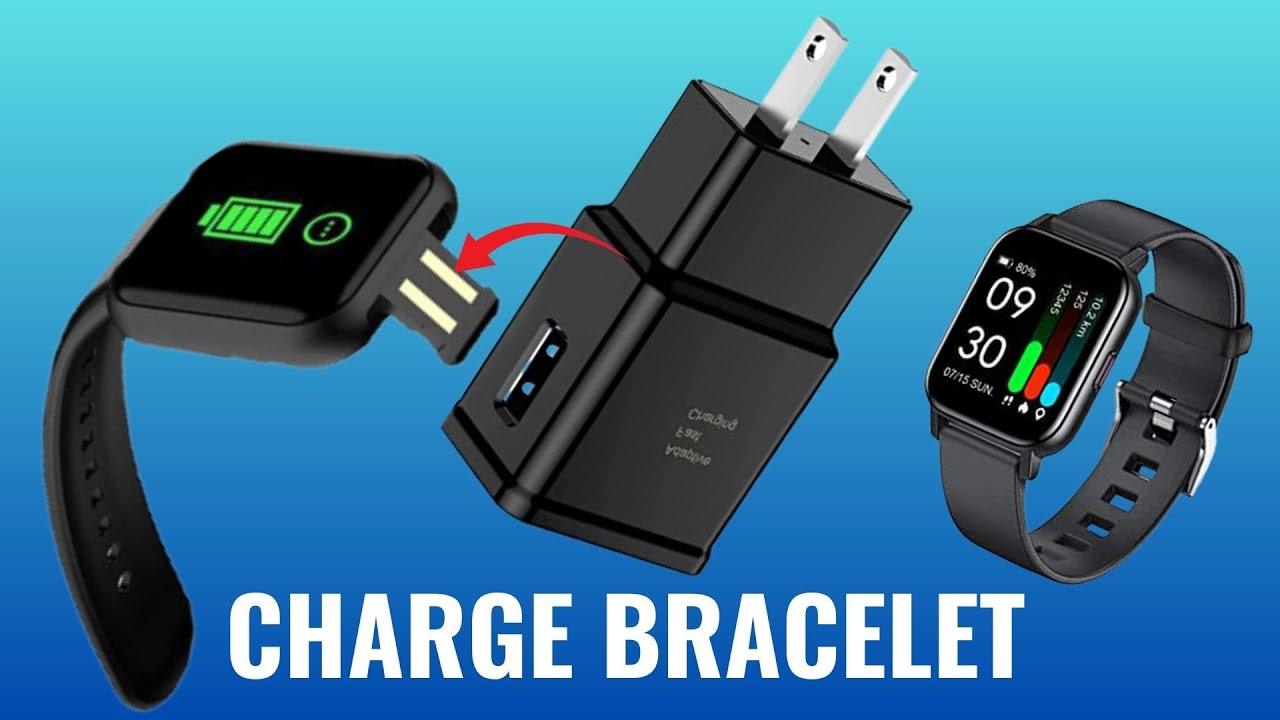
USB cables help charge smartwatches quickly. Find the charging port on the watch. Plug one end of the cable into this port. Connect the other end to a computer or wall adapter. Make sure the watch is on the charger. Look for a charging symbol on the screen. This means the watch is charging. Charging time can vary. It may take one to two hours. Do not overcharge the watch. Remove the watch once fully charged.
Charging docks are easy to use. Place the smartwatch on the dock. Make sure it fits snugly. Connect the dock to a power source. The watch should start charging. Check the screen for a charging indicator. If there is no indicator, adjust the watch’s position. Full charging can take two hours or more. Avoid leaving the watch on the dock overnight. Overcharging might damage the battery. Regularly check the battery level.
Steps For Charging
Plug the charger into a wall socket. Make sure the socket is working. You might need an adapter. Check the adapter fits well. Ensure the charger cable is not damaged. A damaged cable can be unsafe. Always use the original charger. It helps in faster charging. Avoid using cheap chargers. They might cause issues.
Place the smartwatch on the charging dock. Align it correctly. The watch should fit snugly. Ensure the contact points touch. Check if the watch is charging. Look for a charging icon. Keep the watch still. Moving it can stop charging. Wait until the battery is full. Charging time may vary. It usually takes a few hours.
Monitoring Charge Progress
Look for a charging iconon the screen. It tells if the watch is charging. Some smartwatches show a battery percentagewhile charging. This helps you know how much power is left. Others may blink a lightto indicate charging status. Always check the watch to see the charging progress. If the watch does not show any signs, check the charger connection. Make sure the cable is secureand plugged in properly. Sometimes, a restart can solve the problem.
| Smartwatch Model | Estimated Charging Time |
|---|---|
| Model A | 2 hours |
| Model B | 3 hours |
| Model C | 1.5 hours |
Charging times can differ by model. Check the manualfor your specific watch. Always use the original chargerfor best results. Some watches have fast charging options. These can reduce waiting times.
Safety Tips
Overcharging can harm your smartwatch battery. Unplug the charger when it’s full. Don’t leave it connected overnight. This can damage the battery. Check the battery level often. Keep it between 20% and 80%. This helps the battery last longer.
Always use approved chargers and cables. They protect your smartwatch from damage. Cheap chargers can harm the battery. They might not work well. Check for the brand logo on accessories. This ensures they are safe. Using the right charger keeps your device healthy.
Troubleshooting Charging Issues
Check if the charger is plugged in correctly. Look at the pins on the charger. They should be clean. Dust can stop a good connection. Sometimes, the charging cable may be the problem. Try another cable. Ensure the power source is working. Use a different outlet or USB port. If your watch still won’t charge, the charging pad could be faulty. Replace it if needed.
Slow charging can be frustrating. First, check if the charger is original. Fake chargers may not work well. Keep your smartwatch software updated. Updates help improve battery life. Turn off unnecessary apps while charging. Apps can drain power. Make sure the charging pins on the watch are clean. A dirty pin can slow charging. Sometimes, the battery might be old. Consider getting a new battery if charging remains slow.
Credit: m.youtube.com
Credit: www.tiktok.com
Frequently Asked Questions
How To Charge A Smartwatch Correctly?
To charge a smartwatch correctly, use the manufacturer’s charger and cable. Align the connectors or pins properly. Ensure the charging station is clean. Avoid charging overnight to prevent battery damage. Follow the recommended charging cycle for optimal battery health. Consult the user manual for specific instructions.
Can I Use Any Charger For My Smartwatch?
It’s best to use the charger provided by the smartwatch manufacturer. Using a non-compatible charger can damage the battery or cause overheating. Manufacturers design chargers to meet specific power requirements. Always check compatibility before using alternative charging accessories.
How Long Should I Charge My Smartwatch?
Charging times vary by model, but most smartwatches take 1-2 hours to fully charge. Avoid overcharging as it can reduce battery lifespan. Monitor charging progress through notifications or indicator lights. Consult the manual for specific charging instructions tailored to your smartwatch.
Is It Safe To Charge Smartwatch Overnight?
Charging your smartwatch overnight is not recommended. Overcharging can lead to battery degradation over time. Most modern smartwatches have built-in protections, but it’s safer to unplug once fully charged. Regularly charging overnight may shorten battery life, impacting device performance.
Conclusion
Charging your smartwatch is simple once you know the steps. Always use the charger that came with it. This ensures safety and efficiency. Keep your smartwatch and charger clean and dry. Avoid charging in extreme temperatures. Check your smartwatch’s battery status regularly.
This helps to avoid overcharging. Follow the tips mentioned to extend battery life. A well-charged smartwatch enhances its performance. Stay connected and enjoy your smartwatch with ease. Remember, proper care ensures a longer-lasting device. Happy charging!

Finnian Delaney is a seasoned writer and editor specializing in technology and electronics. At ElectroDoz, he covers a wide range of topics, with a focus on MacBooks, laptops, fitness trackers, keyboards, and computer hardware. With a knack for making complex tech accessible, Finnian helps readers stay informed and confident when choosing their next device or upgrade.