How Do I Connect My Smartwatch to My Phone: Easy Guide
Imagine having a tiny assistant wrapped around your wrist, ready to help you tackle your day with ease. That’s exactly what your smartwatch can do when connected to your phone!
You might be wondering how this seamless connection happens and what benefits it brings to your daily routine. This guide is here to clear up any confusion and walk you through the simple steps to sync your smartwatch with your phone.
By the end of this article, you’ll be able to unlock a world of convenience and efficiency, making your life smoother and more organized. Stay with us as we reveal how you can transform your smartwatch into a powerful companion.
Compatibility Check
Connecting a smartwatch to a phone involves checking compatibility between devices. Make sure both your smartwatch and smartphone are Bluetooth enabled. Follow the pairing instructions on your smartwatch to connect seamlessly.
Operating System Requirements
A smartwatch needs the right operating system to connect. Android watches work well with Android phones. Apple watches work best with iPhones. Some watches may work with both. Always check the OS version. This ensures a smooth connection.
Device Specifications
Your phone and watch should meet certain specs. Bluetooth is a must for connection. A strong battery is important too. It helps in long use. Check if your phone has the latest updates. This is important for new features.

Credit: www.youtube.com
Preparing Your Devices
Ensure your smartwatch is fully charged. Most smartwatches need a USB cableto charge. Plug the cable into a power source. Connect the other end to your watch. Check the battery icon. It should show charging. Wait until the battery is full. This process can take one to two hours. A full charge ensures your watch works properly.
Bluetooth must be turned onfor connection. Go to settings on your phone. Find the Bluetooth option. Tap to turn it on. Make sure your smartwatch Bluetooth is also on. This allows devices to find each other. Look for your watch name in phone’s Bluetooth list. Select it to connect. Your watch and phone are now linked. Always keep Bluetooth on for a stable connection.
Downloading The Companion App
Smartwatches need a companion app to connect to your phone. First, check your watch’s brand and model. Search for the app in the App Store or Google Play. The app name usually matches the watch’s brand. Read app reviews to ensure it’s the right one.
Installation is simple. Tap the download button in the app store. Wait for the app to download and install. The app icon will appear on your phone screen. Open the app to start connecting your watch.
Credit: support.apple.com
Pairing Your Smartwatch
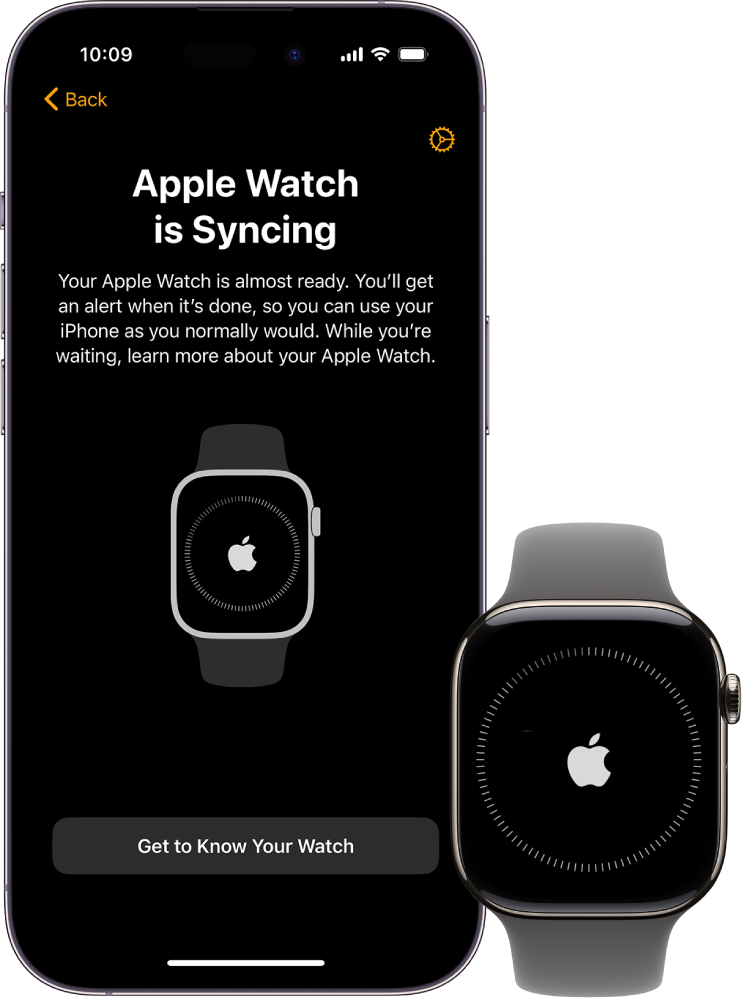
Start by turning on your smartwatch. Look for the settings menu. Find the option for pairing mode. This might be under connectivity settings. Activate the pairing mode. The watch will start searching for devices. Make sure your phone is ready too. Both devices should be close to each other.
Open settings on your phone. Find the Bluetooth option. Turn on Bluetooth. Your phone will search for devices nearby. Your smartwatch should appear on the list. Select your smartwatch from the list. Follow any prompts on the screen. Wait for the devices to connect. Once connected, you can use your watch with your phone. Remember to keep Bluetooth on for best results.
Troubleshooting Connection Issues
Pairing problems can be frustrating. Bluetooth may not turn on. Check if your device’s Bluetooth is active. Range matters too. Keep devices close during pairing. Sometimes, software updates help. Check for updates on both devices. Compatibility is key. Ensure your smartwatch and phone can pair. If they can’t, try another phone. Battery level can affect pairing. Ensure both devices have enough charge. Interference is another issue. Avoid crowded places with many devices.
Resetting can solve many problems. It helps refresh the connection. Start by resetting the smartwatch. Find the reset option in settings. Then, reset the phone. This clears old connections. After resetting, try pairing again. Factory reset is an option. Use it if nothing else works. Be careful; it deletes all data. Backup important information before a factory reset. Try these steps. They often help.
Customizing Settings
Connecting your smartwatch to your phone involves tweaking Bluetooth settings and downloading the right app. Ensure both devices are compatible and follow the on-screen instructions for a seamless pairing process. Enjoy synced notifications and health tracking right from your wrist.
Syncing Notifications
To get alerts on your smartwatch, sync it with your phone. This helps you see messages and calls on your wrist. Check if both your devices are connected by Bluetooth. Open the app for your watch on your phone. Toggle the notifications you want to see. Choose apps that you use a lot. This way, you won’t miss important alerts. Always keep the app updated for best results.
Personalizing Watch Faces
Make your smartwatch look cool by changing its watch face. Open the watch app on your phone. Go to the section called ‘Watch Faces’. Pick a design you like. You can choose a bright or simple one. Tap to set it as your watch face. Some designs let you add shortcuts. This means you can open apps faster. You can change your watch face anytime. Explore different styles for fun!
Exploring Features
Smartwatches help you stay active and healthy. They track your steps and heart rate. You can see how many calories you burn. This helps you plan your workouts better. You can set goals for your health. The watch reminds you to move. It tells you when you sit too long. It also tracks your sleep. You can see if you sleep well. This helps you feel good every day.
Talking to your watch is easy. You can ask it questions. It understands your voice. You can set reminders with your voice. You can even call friends. No need to touch your watch. Just speak clearly. It listens and helps you. You can also send messages. Just tell your watch what to say. It makes life simple and fun.

Credit: www.tiktok.com
Frequently Asked Questions
How Do I Pair My Smartwatch With My Phone?
To pair your smartwatch, first enable Bluetooth on your phone. Open the smartwatch app on your phone and select “Add Device. ” Follow the on-screen instructions to complete the pairing process. Ensure your smartwatch is charged and within range of your phone for a seamless connection.
Why Won’t My Smartwatch Connect To My Phone?
If your smartwatch won’t connect, check if Bluetooth is enabled on both devices. Restart both your phone and smartwatch. Ensure they’re within close range. Check for any software updates on both devices. If issues persist, unpair and pair the devices again to reset the connection.
Can I Connect My Smartwatch Without Bluetooth?
Most smartwatches require Bluetooth for connection. However, some models offer Wi-Fi or cellular connectivity. Ensure your smartwatch and phone support these features. Check the manufacturer’s instructions for alternative connection options. Bluetooth remains the most common and reliable method for pairing smartwatches with phones.
How To Connect A Smartwatch To An Iphone?
To connect a smartwatch to an iPhone, download the compatible app from the App Store. Enable Bluetooth on your iPhone and open the app. Follow the pairing instructions provided. Ensure both devices are up-to-date and in close proximity for a successful connection.
Conclusion
Connecting your smartwatch to your phone is simple and quick. Follow the steps provided in this guide. Your devices will sync seamlessly. Enjoy new features and better convenience. Stay updated with notifications on your wrist. Track health and fitness effortlessly.
Remember to keep your devices close during setup. Ensure Bluetooth is on for a smooth connection. Explore apps and settings on your smartwatch. Personalize it to suit your needs. A well-connected smartwatch enhances your daily life. Embrace the technology at your fingertips.
Make the most of your smartwatch and phone pairing. Stay connected and informed every day.

Finnian Delaney is a seasoned writer and editor specializing in technology and electronics. At ElectroDoz, he covers a wide range of topics, with a focus on MacBooks, laptops, fitness trackers, keyboards, and computer hardware. With a knack for making complex tech accessible, Finnian helps readers stay informed and confident when choosing their next device or upgrade.