How to Change Dometic Thermostat to Fahrenheit: Easy Guide
Are you struggling with your Dometic thermostat set in a unit of measure that feels foreign to you? You’re not alone.
Many find themselves puzzled when their thermostat displays temperatures in Celsius instead of Fahrenheit. This small inconvenience can make it challenging to achieve your desired comfort level. The good news is, switching your Dometic thermostat to Fahrenheit is a simple process.
Imagine the relief of seeing your preferred temperature scale every day. You’ll no longer have to convert numbers in your head, making your daily life just a little bit easier. We’ll guide you step-by-step through the process. By the end, you’ll have the confidence and knowledge to make the change quickly and effortlessly. Keep reading, and let’s transform your experience with your Dometic thermostat today!
Why Change To Fahrenheit
Fahrenheit is widely used in the United States. This makes it familiar to many. Temperatures in Fahrenheit are often more precise. Fahrenheit provides smaller degree changes. This can help in fine-tuning comfort levels. It makes it easy to set your preferred room climate. Fahrenheit offers a clear way to understand extreme weather. Hot or cold, the scale is simple. Reading temperatures becomes intuitive. Understanding weather forecasts is easier too. This can make planning outdoor activities more effective. The Fahrenheit system is user-friendly. It helps in personalizing home environments. Many prefer it for its clarity and ease.
Understanding The Dometic Thermostat
There are several models of Dometic thermostats. Popular ones include the CT Single Zone and Comfort Control Center. Each model has its own features. Some models have digital displays. Others may have buttons for easy navigation. Identifying your model is crucial. It helps in setting the temperature correctly.
Most Dometic thermostats have simple features. Temperature control is the main feature. Users can set temperature easily. Other features include fan control and mode selection. Some models have an energy-saving mode. This helps save power. Ease of use is a key benefit. These features make life easier in RVs.
Preparation Steps
Find a small screwdriver. You need it to open the thermostat. Keep a flashlight handy. It helps you see clearly. Have a manual nearby. It guides you through the steps. Gather all tools before you start.
Turn off the power. This stops any electrical shock. Wear gloves for hand safety. Gloves protect your skin. Keep children away. They might get hurt. Work in a dry place. Water and electricity are dangerous.
Credit: johnmarucci.com
Accessing The Settings Menu
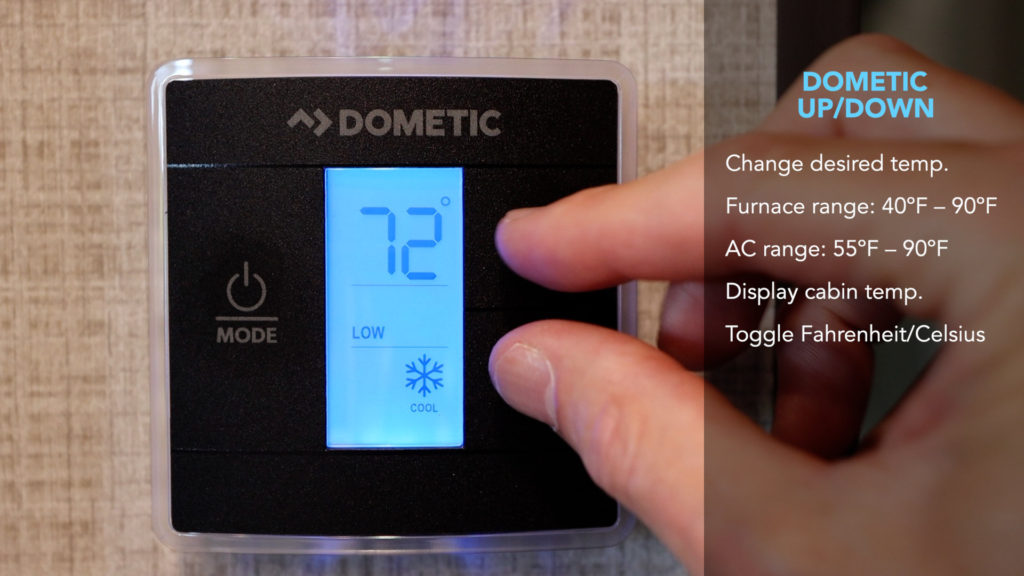
Find the menu buttonon the thermostat screen. It might be labeled or just an icon. This button lets you enter the settings menu. The location can differ by model. Look near the main display or on the side.
Once inside the menu, use the arrowsto move. They help you scroll through options. Look for the temperature settings. This option lets you change the unit to Fahrenheit. Press the select buttonto confirm changes. Always check if the display updates to Fahrenheit.
Changing To Fahrenheit
First, locate the thermostat panelon your device. Find the mode button. Press it until the display shows the settings. Next, look for the up and down arrows. These control the temperature. Hold both arrows together. Do this for three seconds. The display will change. Now, it shows a new setting. Choose Fahrenheitor Celsius. To select Fahrenheit, press the mode button again. Your thermostat now uses Fahrenheit.
Sometimes, the display does not change. Check the batteries. They might be dead. Replace them if needed. Ensure all buttons work well. Clean the panel to remove dirt. If problems continue, consult the user manual. It has more solutions. Also, consider contacting a professional. They can help with difficult issues.
Testing The New Settings
Check the thermostat display. It should show the new setting. Look at the numbers on the screen. Make sure they match your desired temperature. Hold your hand near a vent. Feel the air coming out. Is it cool or warm? Compare it to what the display says. The air should match the display. If it feels wrong, check again. Repeat the process if needed.
Sometimes, the thermostat needs fine-tuning. Use a thermometer to help. Place it near the thermostat. Wait a few minutes. Compare the thermometer and thermostat readings. They should be close. If not, adjust the thermostat. Make small changes. Check again after each change. Keep doing this until the readings match. Now your thermostat should be accurate. Enjoy the right temperature in your space!
Maintaining Your Thermostat
Regular checksensure your thermostat works right. Check the settings often. Make sure it’s set to the correct mode. The display should show the right temperature. Dust can block the sensors. Clean it gently with a soft cloth. Test the batteries often. Change them if they are low. Keep the manual handy. It helps with any issues.
Sometimes, thermostats need expert help. Call a professional for a thorough check-up. Experts can spot hidden issues. They fix problems you might miss. Professional servicing keeps your thermostat in top shape. It helps avoid bigger problems later. Regular expert checks ensure it lasts longer. It’s a smart way to care for your device.
Credit: www.forestriverforums.com
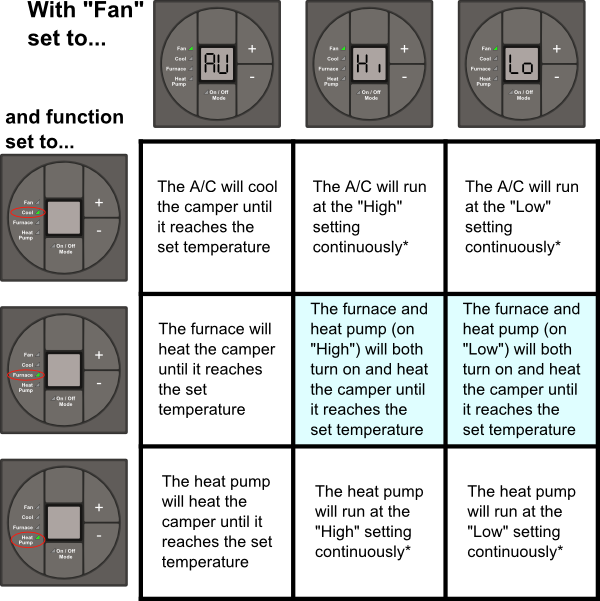
Credit: robertssales.com
Frequently Asked Questions
How Do You Switch Dometic Thermostat To Fahrenheit?
To change your Dometic thermostat to Fahrenheit, locate the temperature settings menu. Press the mode button until you find the temperature unit option. Use the up or down arrows to toggle between Celsius and Fahrenheit. Confirm your choice by pressing the mode button again.
Your settings should now display in Fahrenheit.
Why Does My Dometic Thermostat Show Celsius?
Your Dometic thermostat might default to Celsius due to factory settings. These can differ by region. You can easily switch to Fahrenheit by accessing the temperature settings menu. Follow the instructions in the user manual to change the display settings to your preferred unit.
Can I Manually Adjust The Temperature Unit On Dometic?
Yes, you can manually adjust the temperature unit on a Dometic thermostat. Access the temperature settings through the menu. Use the mode button to find the temperature unit option. Toggle between Celsius and Fahrenheit using the up or down arrows.
Confirm your selection to change the display.
What If Dometic Thermostat Doesn’t Switch To Fahrenheit?
If your Dometic thermostat doesn’t switch to Fahrenheit, ensure the device is functioning correctly. Check for any firmware updates or reset the thermostat. Consult the user manual for troubleshooting tips or contact Dometic customer service for further assistance. They can provide guidance to resolve the issue.
Conclusion
Changing your Dometic thermostat to Fahrenheit is simple. Follow the steps carefully. First, locate the mode button. Press until the display flashes. Next, use the plus or minus keys to select Fahrenheit. Confirm your choice by pressing the mode button again.
Now, your thermostat shows temperatures in Fahrenheit. This small change makes temperature reading easier. Enjoy more comfortable RV adventures. Feel free to share this guide with friends. Happy traveling!

Jaxon Wilder is a tech enthusiast and contributor at ElectroDoz, where he dives into the latest trends in electronics and smart gadgets. With a sharp eye for innovation and hands-on testing, Jaxon brings readers practical reviews, tips, and insights on everything from everyday tech accessories to advanced devices. His goal is to make technology simpler, smarter, and more enjoyable for everyone.