How to Charge Phone With Wireless Charger: Quick Guide
Imagine never having to untangle charging cables again or frantically searching for your phone charger in the middle of the night. With wireless charging, you can easily power up your phone by simply placing it on a charging pad.
It’s not just convenient; it’s a game-changer. But how do you make sure you’re getting the most out of your wireless charger? This article is your guide to mastering wireless charging, ensuring your phone is always ready when you are.
Discover the simple steps to seamlessly charge your phone and embrace the freedom from cords. Keep reading to unlock a hassle-free charging experience that fits perfectly into your busy lifestyle.
Wireless Charging Basics
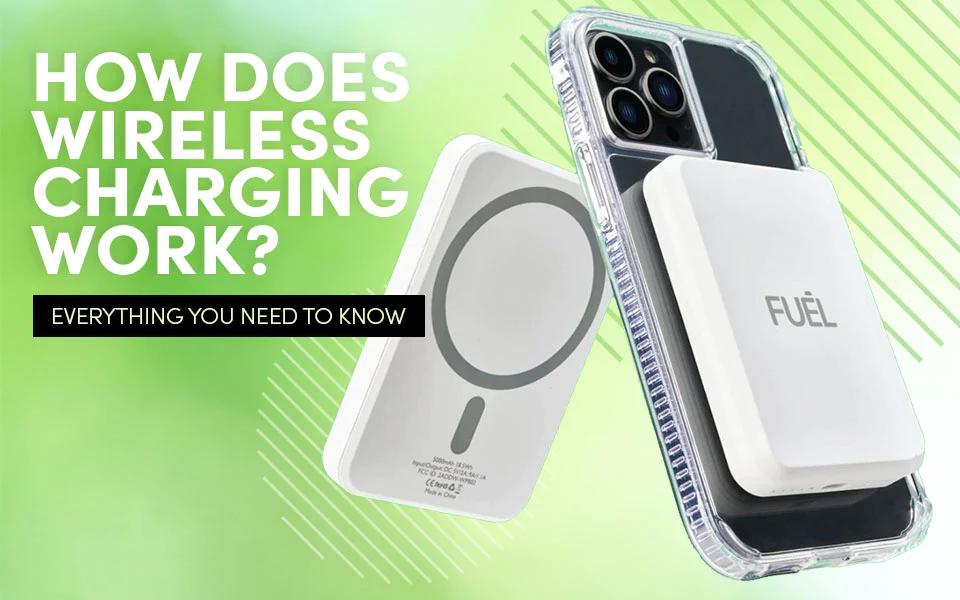
Wireless chargers use magnetic fieldsto send energy. This energy is sent through the air. The phone takes this energy and changes it into power. The charger has a coil. The phone has a coil too. These coils work together. They send power without wires. It’s safe and easy.
Wireless charging is convenient. No need for cables. Just place the phone on the charger. It is also clean. Fewer cables mean less mess. Wireless charging is also safe. No risk of electric shock. The phone can charge even with a case. It’s simple and fast.
Choosing The Right Wireless Charger
Check if your device supports wireless charging. Not all phones can use it. Some phones need a special case. Look for a Qi-compatible charger. Qi is a common wireless charging standard. Many phones use it. Make sure your phone is Qi-compatible.
Wireless chargers have different power outputs. Some are faster than others. Look for a charger with at least 10 watts. It charges phones faster. But, your phone must support fast wireless charging. Otherwise, it will charge slowly.
Choose a charger with a sturdy design. It should be durable. Look for chargers with non-slip surfaces. Your phone should stay in place while charging. Consider the size and weight too. A portable charger is good for travel.
Setting Up Your Wireless Charger
Choose a flat surface for the wireless charger. Avoid places near water. Keep it away from metal objects. Position it near where you often sit. Ensure the surface is stable. This helps the charger stay in place. Check if the spot is easy to reach. You want to place the phone easily.
Plug the charger into a power outlet. Use the cable that came with it. Make sure the cable is not tangled. Check if the light on the charger turns on. This shows it has power. Place your phone on the charger. Check if the phone starts charging. Sometimes, you need to adjust the phone a bit. Ensure the phone’s back is on the charger.

Credit: www.cmd-ltd.com
Charging Your Phone Wirelessly
Place your phone on the wireless charger. Ensure it lies flat. Do not tilt or slant the phone. Make sure the charging pad is on a stable surface. A table or desk is ideal. Avoid placing the charger on soft surfaces. These can block the charging signal.
Align the phone’s charging coil with the charger’s coil. This is important for efficient charging. Many chargers have a light indicator. It shows if alignment is correct. If the light is off, adjust the phone’s position. Move it slightly until the light turns on. This ensures the phone charges correctly.
Troubleshooting Common Issues
Check if the charger is plugged into the power source. Make sure your phone is aligned correctly on the charger. Remove any case or cover that might block the charging.
Ensure your phone is placed at the center of the charger. Disable apps running in the background. This can help speed up charging. Some chargers need the phone to stay still to work faster.
Avoid placing metal objects near the charger. They can cause problems. Move other electronic devices away from the charger. These can create interference. Keep the charger on a flat surface. It works best this way.

Credit: www.youtube.com
Extending Battery Life Tips
Keep the phone cool. Heat can damage the battery. Avoid direct sunlight. Use the phone in shade. Don’t charge under blankets. Blankets trap heat. Charge on hard surfaces. Heat escapes better. Do not use the phone while charging. This adds heat.
Charge the phone regularly. Don’t let it drop below 20%. Avoid overcharging. Remove the charger once full. Use a good quality charger. Cheap ones might harm the battery. Check battery settings. Set it to optimize health. Restart the phone often. This refreshes battery use.
Credit: case-mate.com
Frequently Asked Questions
How Do I Use A Wireless Charger?
To use a wireless charger, plug it into a power source. Place your phone on the charging pad. Ensure your phone is centered for optimal charging. Make sure your device is compatible with wireless charging. Remove any metal objects from the phone’s back.
Can Any Phone Charge Wirelessly?
Not all phones support wireless charging. Most modern smartphones, like recent iPhones and Android devices, do. Check your phone’s specifications to confirm. If your device isn’t compatible, consider purchasing a wireless charging adapter. These adapters can enable wireless charging on older phones.
Does Wireless Charging Harm My Phone?
Wireless charging is safe for your phone. It doesn’t harm the battery more than wired charging. It uses electromagnetic fields to transfer energy. Follow manufacturer guidelines for best results. Avoid using poor-quality chargers to prevent potential issues.
Is Wireless Charging Slower Than Wired?
Wireless charging is generally slower than wired charging. Charging speed depends on the charger’s power output. High-power wireless chargers offer faster charging rates. Phone compatibility also affects charging speed. For the fastest charging, use a high-power wired charger.
Conclusion
Wireless charging simplifies phone charging. No cords, no fuss. Just place your phone. Align it correctly for best results. Ensure your charger is compatible. A stable surface is essential. Avoid metal objects nearby. Charging speed varies by model. Keep your phone’s software updated.
This ensures compatibility with chargers. Explore different chargers for your needs. Enjoy the convenience of wireless charging. It makes life easier. No more tangled cables. Charge easily at home or work. Now, you know how to use a wireless charger.
Try it and experience the difference. Happy charging!

Marlowe Quinn is a technology writer at ElectroDoz, with expertise in smartphones, chargers, power banks, phone cases, selfie sticks, and other mobile accessories. Known for breaking down specs and features into easy-to-understand insights, Marlowe helps readers find the right gadgets to stay connected and powered up in their daily lives.