How to Clean a Phone Charging Port: Quick & Easy Tips
Have you ever faced the frustration of plugging your phone into the charger, only to find it isn’t charging as expected? Your phone’s charging port might be the culprit.
Dust, lint, and debris can easily accumulate in this tiny space, causing connectivity issues. But don’t worry, cleaning your phone’s charging port is easier than you think, and we’re here to show you how. Imagine the relief of watching your device charge smoothly after a quick and simple cleaning session.
You won’t believe the difference it can make! Stick with us, and you’ll discover the secrets to maintaining your phone’s optimal performance, saving you time and avoiding unnecessary stress. Ready to transform your phone charging experience? Let’s dive in!
Signs Of A Dirty Charging Port
A phone charging port can get dirty over time. A common sign is slow charging. Your phone might take longer to charge. You may notice the charger doesn’t fit well. It might feel loose or wobbly. Sometimes, the phone stops charging altogether. Another sign is intermittent charging. The phone starts charging, then stops suddenly. Dust and lint often cause these issues. Over time, these particles build up inside the port. They block the connection between the charger and the phone. Cleaning the port can fix these problems. It helps maintain a good connection. It ensures your phone charges efficiently.
Essential Cleaning Tools
Cleaning a phone charging port needs care. Use a soft brush. It helps remove dirt without damage. A can of compressed airis useful. It blows out tiny dust particles. A toothpickcan also help. Be gentle when using it. Avoid metal objects. They can scratch the port. A microfiber clothis good for wiping. It keeps the area clean. Always make sure the phone is off. This prevents damage. Keep these tools handy for regular cleaning. They will help your phone charge well.
Safety Precautions
Always turn off your phone before cleaning. This keeps you safe. Use a soft tool like a toothpick. Never use metal objects. They can damage the port. Be gentle while cleaning. The port is delicate. Avoid using water or liquid cleaners. Liquids can cause harm. Hold the phone steady to prevent slips. Work in a bright place. Good light helps you see better.
Safety gear is important. Wear gloves if possible. Gloves protect your hands. Keep your phone away from kids. Cleaning tools should be stored safely. After cleaning, check the port. Make sure it’s dry and clean. Test the charger to see if it works. If unsure, ask an adult for help. Stay safe always.
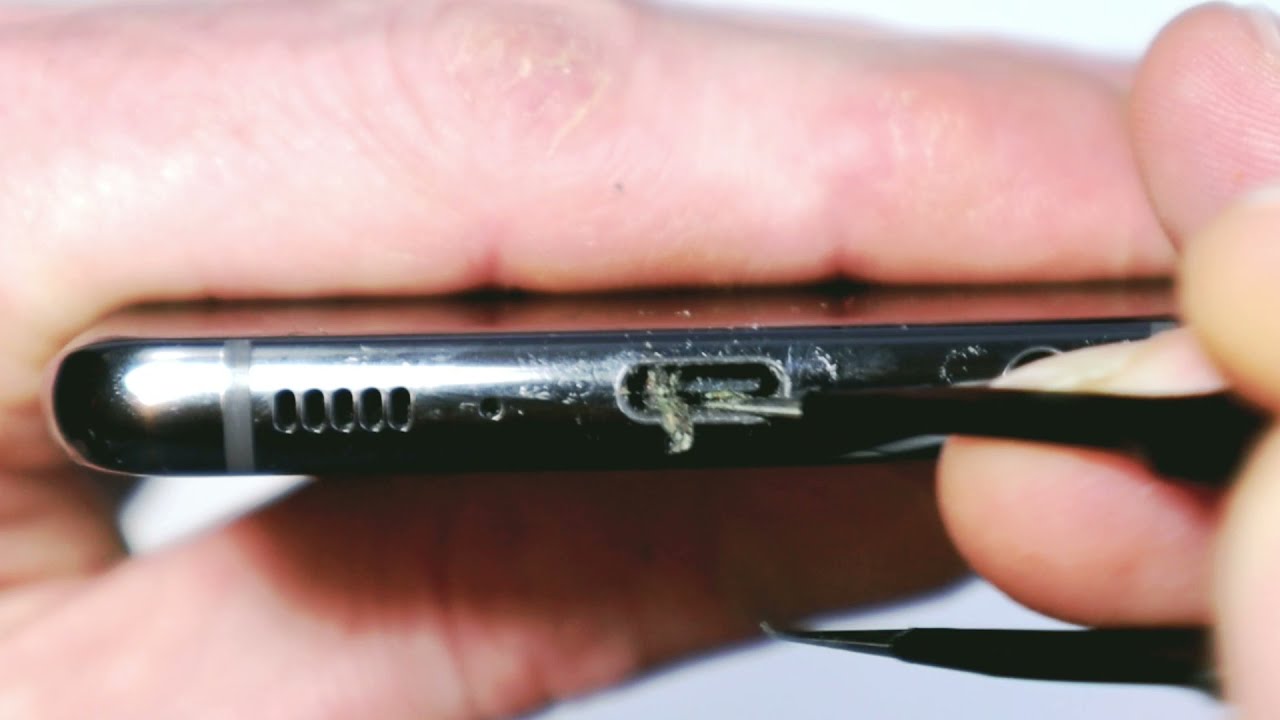
Credit: www.youtube.com
Step-by-step Cleaning Guide
Turn off your phone. Safety first. No electricity running. Helps avoid shocks.
Look inside the port. Check for dirt or lint. Use a flashlight. Identify any blockage.
Get a can of compressed air. Blow air gently into the port. Remove loose particles. Keep the can upright.
Use a wooden toothpick. Carefully poke inside the port. Scrape out debris. Do not push hard.
Never use metal objects. Don’t apply too much pressure. Be gentle. Protect the delicate pins.
Alternative Cleaning Methods
Explore alternative ways to clean your phone’s charging port safely. Gently use a toothpick or compressed air to remove debris. Avoid liquids to prevent damage and ensure efficient charging.
Using A Soft Brush
A soft brush is gentle for cleaning a charging port. It helps remove tiny debris. Choose a brush with soft bristles to avoid damage. Carefully insert the brush into the port. Move it around to dislodge dirt. Check the port to see if it’s clean. Repeat if necessary. Be gentle to avoid bending connectors. A soft brush is handy for regular cleaning.
Employing Isopropyl Alcohol
Isopropyl alcohol cleans ports effectively. It removes sticky dirt and grime. Use a cotton swab slightly dampened with alcohol. Carefully insert into the port. Gently rub around the edges and inside. Avoid using too much alcohol. Too much can cause damage. Ensure the port dries completely before use. Alcohol is a good solution for stubborn dirt.

Credit: www.asurion.com
Preventing Future Build-up
Keep your phone away from dust. Dust can clog the charging port. Use a soft cloth to wipe the phone. Regular cleaning keeps the port clear. Ensure the cloth is dry. Wet cloths can damage the phone.
Check the port often. Look for signs of dirt. Inspect it before charging. Cleaning should be gentle. Avoid using sharp objects. They can harm the port.
Use a phone cover. Covers shield the port from dirt. Choose a cover with a flap. Flaps protect better. Avoid leaving the phone in dusty places. Store it in a clean area.
Avoid eating near your phone. Food particles can enter the port. Keep the phone away from liquids. Water can damage it. Be careful when carrying your phone. Carry it in a safe place.
When To Seek Professional Help
Sometimes, cleaning a phone charging port can be tricky. If the port is damaged or still not working after cleaning, professional help might be needed. Experts can check if your port is broken or if there’s another problem. They can fix it safely without causing more damage. Safety is important, especially with phone parts.
Trying to fix a port yourself can be risky. If you use tools that are not right, it can harm your phone. Professional technicians have the right tools and skills. They can make sure your phone works well and keeps working. It’s better to ask for help than to cause more problems.
Trust the experts when you’re unsure. They know how phones work. They can help when cleaning isn’t enough. Getting help can save your phone and your time.

Credit: www.tomsguide.com
Frequently Asked Questions
How Do I Know If My Charging Port Is Dirty?
If your phone charges slowly or inconsistently, your port might be dirty. Dust or debris can obstruct the connection. You might also notice your charging cable not fitting snugly. Regularly checking and cleaning can prevent these issues. Using a flashlight can help you see any dirt inside the port.
Can A Dirty Port Damage My Phone?
Yes, a dirty charging port can cause permanent damage. Dirt and debris can lead to poor connections, causing your phone to overheat. This might damage internal components over time. Regular cleaning helps maintain a stable connection and prolongs your phone’s lifespan.
Always ensure your port is clean and free from obstructions.
What Tools Can I Use To Clean The Port?
Use a small, soft brush or compressed air for cleaning. A toothpick can help dislodge debris gently. Avoid using metal objects as they may damage the port. Ensure your phone is turned off before cleaning. Regular maintenance with these tools can keep your port functioning well.
How Often Should I Clean My Charging Port?
Clean your charging port every few months or when you notice charging issues. Regular cleaning prevents debris buildup and maintains optimal charging performance. If you frequently carry your phone in your pocket, consider cleaning it more often. Consistent maintenance ensures your phone charges efficiently and prolongs its lifespan.
Conclusion
Cleaning your phone’s charging port keeps it working well. A clean port ensures smooth charging. Use simple tools like a toothpick or compressed air. Gently remove dust and debris. Always power off your phone before cleaning. Be patient and careful to avoid damage.
Regular checks prevent buildup and improve performance. Keep your phone’s charging port clean for better longevity. It’s an easy task that makes a big difference. Remember, prevention is better than repair. A few minutes of care can save future problems.
Enjoy a hassle-free charging experience with these simple tips.

Marlowe Quinn is a technology writer at ElectroDoz, with expertise in smartphones, chargers, power banks, phone cases, selfie sticks, and other mobile accessories. Known for breaking down specs and features into easy-to-understand insights, Marlowe helps readers find the right gadgets to stay connected and powered up in their daily lives.