How to Clean Projector Lens: Easy Expert Tips
Is your projector not delivering the crystal-clear image you once enjoyed? The culprit might be a dirty lens.
Over time, dust and smudges can accumulate, diminishing your viewing experience. Cleaning your projector lens is crucial for maintaining its performance and extending its lifespan. But fear not—this isn’t a task reserved for tech experts. With just a few simple steps, you can restore your projector to its former glory.
In this guide, you’ll discover how to clean your projector lens safely and effectively, ensuring that your movie nights and presentations always look their best. Ready to bring clarity back to your screen? Let’s dive in and get started!
Importance Of A Clean Projector Lens
A projector lens must be clean for clear images. Dust and dirt cause blurry pictures. This can ruin your viewing experience. A dirty lens affects the quality of the image. Cleaning ensures better focus and sharpness.
Regular cleaning helps maintain the device. It prolongs the lifespan of your projector. Dust buildup can cause overheating. This might damage the projector. Keeping the lens clean prevents these issues.
Always handle the lens with care. Use a soft cloth for cleaning. Avoid harsh chemicals. These can damage the lens surface. Proper cleaning keeps your device in good condition.

Credit: www.reddit.com
Signs Your Projector Lens Needs Cleaning
Projector images look blurry? The lens may need cleaning. Dust can make colors dull. Watch for dark spots on the screen. These spots can be tiny. They grow over time, making it worse. Another sign is the projector getting hotter than usual. A clean lens helps it cool down.
Strange noises from the projector can also mean dust inside. A clean lens can make the projector work quietly. If the projector takes longer to start, it might be dirty. A dirty lens can slow down its functions. Keep your projector lens clean for the best view.
Gathering Cleaning Supplies
Cleaning your projector lens is important. Gather soft materials like a microfiber cloth. These cloths are gentle and won’t scratch. Use a lens cleaning solution. It helps remove dirt without leaving marks. Avoid paper towels. They can leave scratches. Compressed air can blow away dust. It’s great for reaching small corners. A soft brush is useful too. It gently removes particles without harm. Store these supplies in a safe place. Keep them clean and ready for use.
Some materials can harm your lens. Avoid rough cloths. They can scratch the surface. Don’t use household cleaners. They can leave a residue. Soap is not safe for lenses. It might damage the delicate glass. Stay away from alcohol-based products. They can wear down the lens coating. Hard brushes are risky. They can cause permanent damage. Be cautious and choose safe tools.
Preparing Your Workspace
Good lighting helps you see the projector lens clearly. Use a lamp or a bright room. Make sure light is not too strong. Strong light can cause glare and shadows. Shadows make cleaning hard. Soft light is best for delicate tasks.
Dust can damage the lens. Clean your workspace first. Use a damp cloth to wipe surfaces. Avoid using a dry cloth. Dry cloth can stir up dust. Close windows and doors to stop dust. Keep the room clean at all times. Regular cleaning is important for a dust-free zone.
Cleaning The Exterior Lens
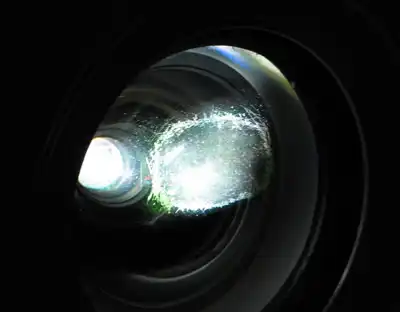
Use a soft brushto remove loose dust. Gently swipe the brush over the lens. Make sure the brush is clean. This step helps to prevent scratches. Always handle the brush with care. Dust can collect on the lens surface easily. Regular dusting keeps the lens clean.
Use a microfiber clothto wipe the lens gently. The cloth must be soft. It helps remove smudges. Wipe in a circular motion. Avoid pressing hard on the lens. The lens is delicate. A clean lens gives a better picture. Keep the cloth clean for best results.
Credit: justprojectors.com.au
Deep Cleaning Techniques
Use a soft cloth for cleaning. Make sure it’s lint-free. A special lens cleaning cloth works best. Gently apply the lens cleaning solutionto the cloth. Never pour it directly on the lens. This avoids damage. Wipe the lens carefully. Use light pressure. This removes dirt and grime.
Clean the lens using small, circular motions. This helps prevent scratches. Begin at the center of the lens. Move outward in circles. This technique is gentle. It cleans effectively. Always be patient and careful. Keep the lens looking clear and new.
Handling Stubborn Stains
Isopropyl alcohol helps with stubborn stains. Use a soft cloth. Pour a little alcohol on it. Gently rub the lens. Move in circular motions. This helps remove dirt. Make sure the cloth is not too wet. Alcohol dries fast. So, it won’t leave marks. Always use a clean cloth.
Pressing hard can scratch the lens. Use a light touch. Let the alcohol do the work. Circular motions are best. They clean without scratching. Clean slowly and carefully. Your lens will stay safe.
Reassembling And Testing
Securing the Lens Capis very important. The lens cap keeps the lens safe. It stops dust and scratches. Make sure the cap is tight. A loose cap can fall off. Check the cap after each use. A secure cap saves the lens from damage.
Checking Projector Performanceis the next step. Turn on the projector. Look at the screen. The picture should be clear. Adjust settings if needed. Check colors and brightness. Test with different images. Make sure everything works well. A clean lens helps the projector show better pictures.
Maintaining A Clean Lens
Creating a regular cleaning schedulefor your projector lens is important. Dust and dirt can build up quickly. This can make your images blurry. Use a soft cloth to wipe the lens. Avoid using rough materials. These can scratch the lens. A lens cleaner can help remove tough spots. Always clean in a gentle way.
Proper storagekeeps the lens clean longer. Store the projector in a dust-free area. Use a cover when not in use. This helps keep dust away. Avoid humid places. Moisture can damage the lens. Keeping the lens clean helps it work better. A clean lens gives clearer images.

Credit: www.youtube.com
Frequently Asked Questions
How Often Should I Clean My Projector Lens?
Clean your projector lens every three to six months, depending on usage. Regular cleaning ensures optimal image quality and prevents dust buildup. If you notice image distortion or dust spots, it’s time to clean the lens. Always follow the manufacturer’s guidelines for best results.
What Tools Are Needed To Clean A Projector Lens?
To clean a projector lens, you’ll need a microfiber cloth, lens cleaning solution, and a blower brush. Avoid using rough materials or household cleaners. These tools help remove dust and smudges without scratching the lens, ensuring a clear projection.
Can I Use Alcohol To Clean The Projector Lens?
Avoid using alcohol as it can damage lens coatings. Instead, use a lens cleaning solution specifically designed for optics. This ensures safe and effective cleaning without harming the lens. Always check the manufacturer’s recommendations for suitable cleaning products.
Why Is My Projector Lens Foggy?
A foggy projector lens is often due to dust, fingerprints, or humidity. Cleaning the lens with a microfiber cloth and lens cleaner can restore clarity. Ensure your projector is stored in a dry, dust-free environment to prevent future issues.
Conclusion
A clean projector lens gives clear images. Dirt and smudges can blur your display. Regular cleaning keeps your projector at its best. Use gentle methods and soft materials. Avoid harsh chemicals. Take your time to ensure a thorough clean. Follow the steps shared in this post for best results.
A little care goes a long way in maintaining your projector. Enjoy bright and sharp visuals every time. Your projector will thank you with stunning clarity. Keep it clean, keep it clear. Simple steps make all the difference. Happy projecting!

Everett Ashford is an electrical engineer and expert in electronics reviews, tips, and troubleshooting. Specializing in audio and sound devices, including earbuds, AirPods, and headphones, he brings in-depth knowledge and practical advice to help consumers make informed decisions.