How to Turn on Selfie Stick Bluetooth: Effortless Guide
Are you ready to capture stunning selfies like never before? Imagine having the perfect tool to elevate your photography game, making every shot Instagram-worthy without the hassle.
A Bluetooth-enabled selfie stick is your answer! But how do you get started? Turning on your selfie stick’s Bluetooth might seem tricky at first, but it’s easier than you think. Whether you’re a tech-savvy individual or someone who just wants great pictures without the fuss, this guide will walk you through the simple steps to activate your selfie stick Bluetooth and start snapping away.
Dive in to discover how to make your selfie stick work for you, and unlock the potential for incredible photos with just a press of a button.
)
Credit: www.cruceroclick.com
Choosing The Right Selfie Stick
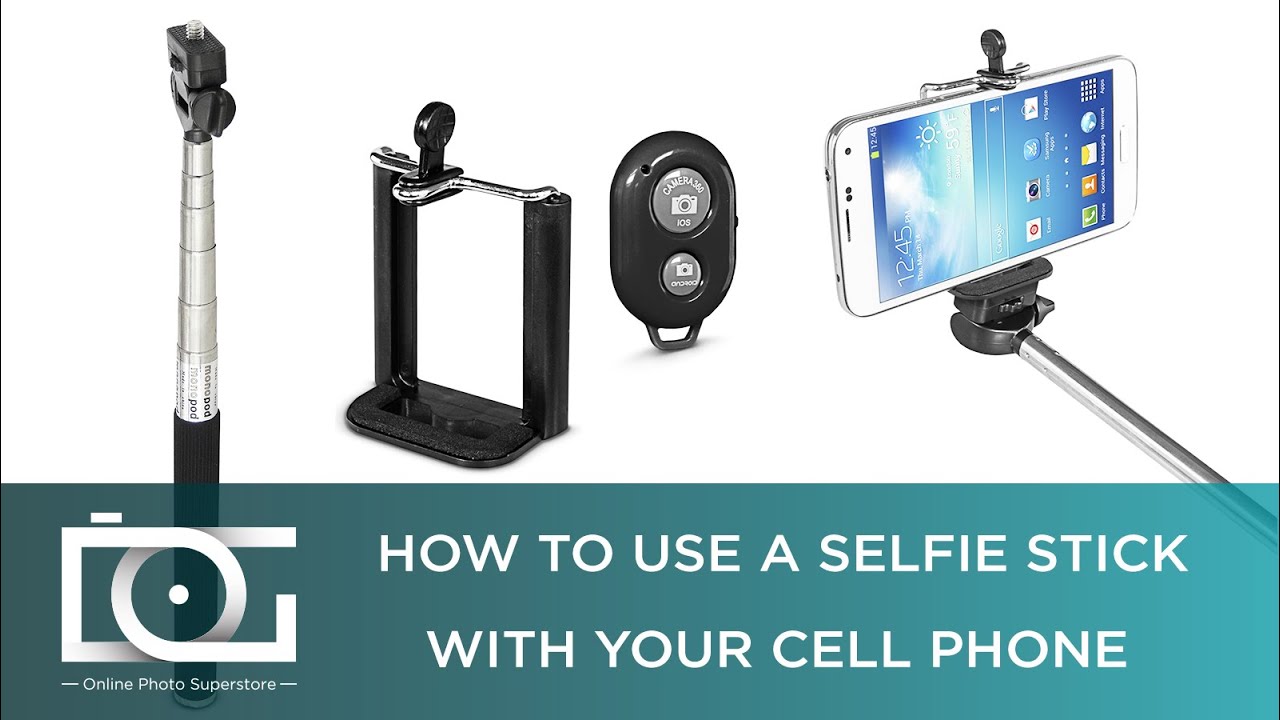
There are different types of selfie sticks. Some are simple and others are smart. Basic sticks do not have Bluetooth. These are usually cheaper. Bluetooth sticks let you take photos wirelessly. They connect to your phone. Some even have a remote control. Consider what you need before buying.
Check if the stick is compatiblewith your phone. Some sticks are for Android. Others are for iPhone. Length is important too. Longer sticks help you fit more in the photo. Look for a stick that is lightand easy to carry. A good grip is important. It stops the stick from slipping. A wrist strap can add safety. Also, check the battery life for Bluetooth sticks. Longer battery means more photos.
Charging Your Selfie Stick
Check the battery light on your selfie stick. Green light means the battery is full. Red light means it needs charging. Some sticks have a small screen. This screen shows battery level as a percentage. Always make sure your stick is charged before use.
Use the correct charger for your selfie stick. Check the charging port size. Plug the charger into a wall socket. Make sure it is securely connected. Charging usually takes a few hours. Do not overcharge the battery. Unplug when the light turns green. This helps the battery last longer.
Activating Bluetooth On Your Device
Open your phone settings. Look for the Bluetoothoption. Tap it. Make sure it is switched to “On.” A blue icon will show it’s active. Check the list for your selfie stick. Tap to connect. Wait for a beep or light. Your stick is now ready.
Tap on “Settings” on your iPhone. Find and select Bluetooth. Switch it to “On.” A small icon should appear. Wait for your selfie stickto show in the list. Tap its name to connect. Once linked, you’re all set.
Pairing The Selfie Stick With Your Device
Find the small button on your selfie stick. This is the pairing button. It is usually on the handle. Press it for a few seconds. A light may flash. This means it’s ready to pair. Make sure your device is on and close by. This helps in finding the signal.
Go to the settings on your device. Look for Bluetoothsettings. Turn Bluetooth on. Wait for the list of devices. Look for your selfie stick’s name. Tap on it to connect. It may take a few seconds. Once connected, you can take photos. Your device and selfie stick are now paired.
Troubleshooting Connection Issues
Many people face issues with their selfie stick connection. Bluetooth might not connect properly. Sometimes, the selfie stick is not visible in the device list. Other times, it may connect but not function. This can be frustrating, especially when you want to take a quick photo. Ensure your phone’s Bluetooth is on and working. Check if other devices are connected to your phone. Disconnect them if necessary. Restart your phone and the selfie stick. This might solve the problem.
Resetting the selfie stick can often help. Find the reset button on your stick. It is usually small and hidden. Use a pin to press it gently. Hold it for a few seconds. The light might blink, indicating a reset. This process will disconnect your stick from any device. Try connecting again after resetting. Follow the steps carefully to ensure success.
Testing Your Selfie Stick
Turn on your selfie stickand connect it to your phone. Open the camera app. Hold the stick steady. Press the button on the stick. Look at the photo. Make sure it is clear. Check the angle and light. Adjust if needed. Try different angles. Find the best one.
Open your phone settings. Go to the Bluetooth section. Find your selfie stick name. Tap to connect. Check the camera settings. Adjust the brightness and focus. Make sure the timer is set. Try the timer for group photos. Use the grid lines to align. Keep practicing for better shots.
Maintaining Your Selfie Stick
Activating your selfie stick’s Bluetooth is simple. First, ensure it’s charged and turned on. Then, access your device’s Bluetooth settings and pair it with the stick. Confirm the connection to start capturing moments effortlessly.
Cleaning And Storage
Keep your selfie stick clean. Use a soft, damp cloth to wipe it. Make sure it is dry before storing. Store in a cool, dry place. Avoid leaving it in the sun. Heat can damage the material. Do not use harsh chemicals. They can ruin the surface. Regular cleaning keeps it looking new. Always handle with care.
Battery Maintenance Tips
Charge the battery after each use. Do not let it drain completely. Use the correct charger only. Overcharging can harm the battery. Keep the battery contacts clean. Wipe with a dry cloth. Store the stick with the battery removed. This prolongs battery life. If unused for long, charge every few months.
Credit: www.youtube.com

Credit: atumtek.com
Frequently Asked Questions
How Do I Connect My Selfie Stick Via Bluetooth?
To connect your selfie stick, first turn it on. Ensure your phone’s Bluetooth is enabled. Search for available devices and select your selfie stick from the list. Once connected, your selfie stick is ready to use. This simple process helps you capture perfect selfies effortlessly.
Why Isn’t My Selfie Stick Connecting?
If your selfie stick isn’t connecting, check its battery. Ensure it’s charged and turned on. Restart Bluetooth on your phone and try reconnecting. Sometimes, interference from other devices can cause issues. Make sure your phone is close to the selfie stick for a stable connection.
How Can I Know If Bluetooth Is On?
To check if Bluetooth is on, go to your phone’s settings. Look for the Bluetooth option and ensure it’s toggled on. You might see a Bluetooth icon in your phone’s status bar. This indicates that Bluetooth is active and ready for pairing with devices.
What Should I Do If My Selfie Stick Is Unresponsive?
If unresponsive, ensure your selfie stick is charged. Turn it off, then back on. Try resetting it by holding the power button for a few seconds. Reconnect via Bluetooth settings on your phone. If issues persist, consult your selfie stick’s manual or contact customer support.
Conclusion
Activating your selfie stick’s Bluetooth is simple and quick. Start by ensuring your selfie stick is charged. Then, switch it on. Access your phone’s Bluetooth settings. Scan for devices. Select your selfie stick from the list. Pair it. Once connected, test by taking a selfie.
This process works for most selfie sticks. Remember, a stable connection makes capturing moments effortless. Keep these steps handy for future reference. Enjoy snapping great photos with ease. Taking selfies will become a fun, seamless experience.

Marlowe Quinn is a technology writer at ElectroDoz, with expertise in smartphones, chargers, power banks, phone cases, selfie sticks, and other mobile accessories. Known for breaking down specs and features into easy-to-understand insights, Marlowe helps readers find the right gadgets to stay connected and powered up in their daily lives.