How Long Do Airpods Take to Charge: Quick Guide
Picture this: you’re about to head out for a run, you’re pumped up, and you’ve got your workout playlist ready. But when you grab your AirPods, they’re dead.
We’ve all been there, and it’s frustrating. If you’ve ever wondered, “How long do AirPods take to charge? ” you’re not alone. Understanding this can save you time and ensure your AirPods are always ready when you need them. We’ll break down the charging times for AirPods, so you can plan better and avoid those silent workouts.
Stick around to discover quick tips that can help you keep your AirPods charged and ready for action.
Charging Basics
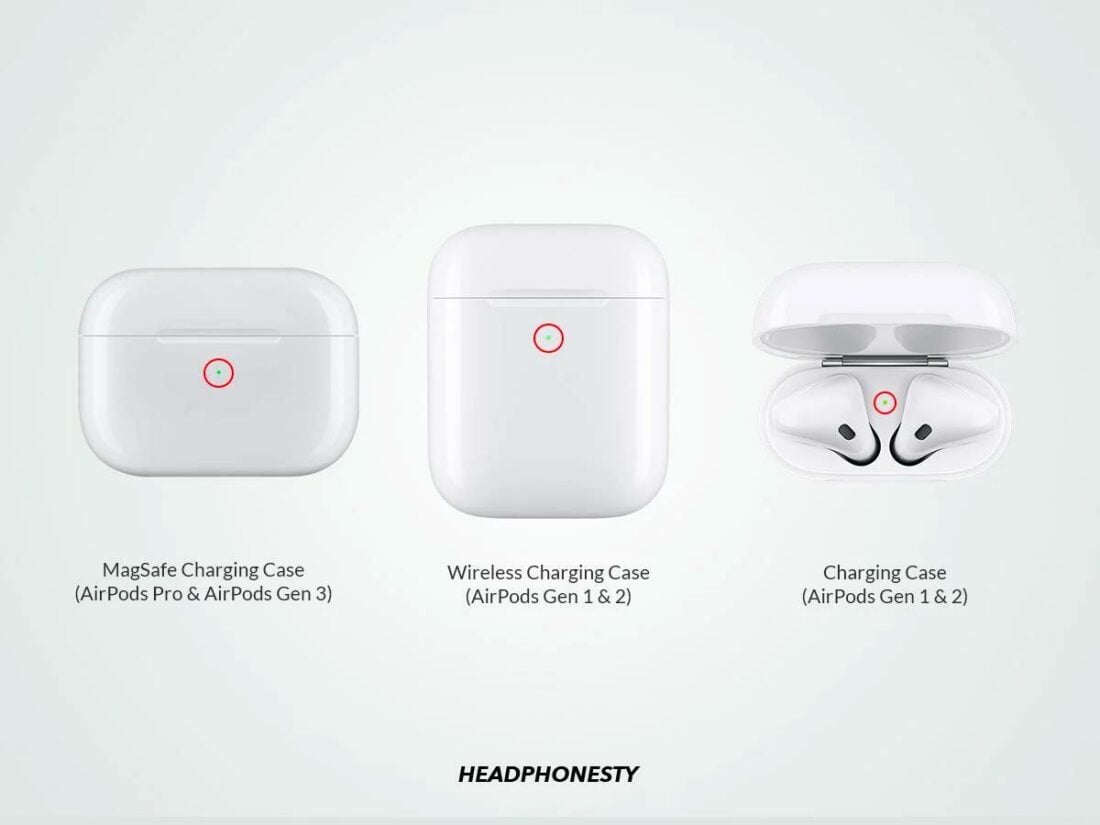
AirPods are very popular wireless earbuds. They are small and easy to use. Charging them is simple. The AirPods case is like a power bank. It stores energy to charge the AirPods. It takes about 15 minutes to charge them for up to 3 hours of listening time. The case needs about 1 hour to fully charge. This gives the AirPods multiple charges. Using a fast chargercan reduce charging time. The LED light shows the charging status. Green means fully charged. Orange means charging is still happening.
Use the original cable for best results. Avoid cheap chargers. Cheap chargers can damage your AirPods. Keep your AirPods clean for better charging. Dust can block the charging ports. Store the case in a cool place. Heat can reduce battery life.
Standard Charging Time
AirPods charge fast. Charging time for AirPods is around 20 minutes. This time is for a full charge in the case. Charging the AirPods only takes about 15 minutes for up to 3 hours of listening. The case itself takes about an hour to fully charge. The case can charge your AirPods several times. Always keep it charged. This way, your AirPods are ready to use anytime. Check the battery status on your phone. Make sure they are charging properly. The indicator light shows charging status. Green means fully charged. Amber means still charging.
Factors Affecting Charging Speed
The health of your AirPods’ battery matters. Older batteries charge slower. New batteries charge faster. Battery health affects charging time. Keep your AirPods healthy for faster charging.
Using a high-quality charger is crucial. Cheap chargers slow down charging. Official Apple chargers work best. They ensure fast charging. Quality matters for speed.
Temperature impacts charging speed. Cold temperatures slow it down. Hot temperatures can harm the battery. Ideal temperature is important. Keep your AirPods in a safe environment.

Credit: support.apple.com
Fast Charging Options
AirPods charge quickly. Fast charging is possible with the right adapter. A 15-minute charge gives about 3 hours of listening time. Use a USB-C to Lightning cable for faster results. The charging case plays a big role. It helps charge the AirPods faster.
Wireless charging is available. It is slower than wired charging. But, it is more convenient. Just place the case on a wireless pad. The LED light shows charging status. This is helpful to know when it is done. Always check the battery level. Keep the case charged for best results.
Tips For Efficient Charging
Use Original Accessoriesfor charging AirPods. They work best with the charger they came with. Original accessories charge faster and safer. Using other chargers might harm your AirPods.
Avoid charging in extreme temperatures. Hot places slow down charging. Cold places can damage the battery. Room temperature is ideal for AirPods charging.
Keep your AirPods updated. Regularly update firmwarefor better performance. Updates fix charging issues. They help your AirPods charge efficiently.

Credit: screenrant.com
Troubleshooting Charging Issues
Make sure the charging cable is not broken. Plug it into the power adapter. The adapter should fit well in the socket. If it feels loose, try another one. Sometimes, dirt can block the connection. Clean the cable ends carefully. Use a soft cloth. Avoid water or wet cloths.
Open the AirPods case and check inside. Look for dust or dirt. These can stop charging. Gently clean with a dry cloth. Make sure the AirPods fit snugly in the case. If they don’t, they may not charge. Also, check the case’s charging port for any blockage.
Press the setup button on the AirPods case. Hold it until the light flashes. This resets the AirPods. Try pairing them again. Resetting can fix many charging issues. Remember, your AirPods need to be in the case for this step. After resetting, check if they charge properly.
Credit: thecarving-board.com
Frequently Asked Questions
How Long Do Airpods Take To Fully Charge?
AirPods typically take about 20 to 30 minutes to fully charge. The charging case needs around 1. 5 hours for a complete charge. Quick charging is a feature of AirPods, providing up to 3 hours of listening time after just 15 minutes in the case.
Can You Charge Airpods Overnight?
Yes, you can charge AirPods overnight without worry. The charging case manages the battery health. Once fully charged, the case stops drawing power. This helps maintain battery life and ensures your AirPods are ready for use.
How Do I Know Airpods Are Charging?
AirPods show charging status through their LED indicator on the case. A green light means fully charged, while an amber light indicates charging. You can also check the battery status on your connected device for more detailed information.
Do Airpods Charge Faster In The Case?
Yes, AirPods charge faster when placed in the charging case. The case provides optimal power for quick charging. Within 15 minutes, your AirPods can gain up to 3 hours of listening time, making it efficient for short breaks.
Conclusion
Charging your AirPods efficiently is simple. First, check the battery level. Then, plug them in using the Lightning cable. It usually takes about 20 to 30 minutes to charge them fully. Keep your AirPods in their case when not in use.
This helps maintain their battery life. Remember, a quick 15-minute charge can give you hours of listening time. So, keep them charged for uninterrupted enjoyment. Understanding these tips ensures you get the most out of your AirPods. Enjoy your music without any worries about battery life.
Happy listening!

Everett Ashford is an electrical engineer and expert in electronics reviews, tips, and troubleshooting. Specializing in audio and sound devices, including earbuds, AirPods, and headphones, he brings in-depth knowledge and practical advice to help consumers make informed decisions.