
How to Measure Projector Screen Size: Step-by-Step Guide
Are you struggling to get that perfect movie night experience or deliver a flawless presentation because the projector screen doesn’t quite fit your needs? Figuring out the ideal projector screen size can feel like solving a puzzle with missing pieces.
But don’t worry, you’ve come to the right place. Understanding how to measure projector screen size isn’t just about numbers; it’s about transforming your living room into a mini-theater or making sure your business presentation captivates the room. With the right screen size, every detail comes to life, enhancing your viewing experience and ensuring you make the best impression.
Stick around, and we’ll guide you through simple, effective steps to measure and choose the perfect projector screen size tailored just for you. Let’s dive in and unlock the key to an unparalleled visual experience!
Projector Screen Basics
Projector screens come in different types. Fixed screens stay on the wall. Pull-down screens roll up when not used. Motorized screens can move up or down. Each type has its own benefits. Choose one based on your needs. Think about space and budget. Fixed screens are good for home use. Motorized screens are great for larger spaces. Pull-down screens are good for classrooms. Always measure the space first.
Screen ratios tell how wide the screen is. The most common ratio is 16:9. This is best for movies. 4:3 ratio is used for presentations. 21:9 ratio gives a wide view. Choose the ratio that fits your content. The right ratio makes a big difference. It affects how the image looks. Always check the projector’s settings. Match the screen ratio with the projector.
Importance Of Accurate Measurement
Accurate screen size measurement is very important. It affects the viewing experience. A screen too big or too small can cause problems. It might strain the eyes. Or, it might not display the full picture. This can make watching movies less fun.
The screen size must match the projector. This ensures clear and sharp images. A mismatched size can lead to blurry pictures. It might also cut off parts of the image. Measuring correctly helps avoid these problems. It makes sure you enjoy your viewing time.
Tools Needed For Measurement
Use a measuring tape to check the screen width. Ensure it’s long enough to cover the screen. Measure from one edge to the other. Accuracy is important. Write down the width. Repeat for the height.
A calculator helps find the screen size. Multiply width by height. This gives the area. It’s simple math. Ensure your numbers are correct. Double check your work. A calculator makes it easier.
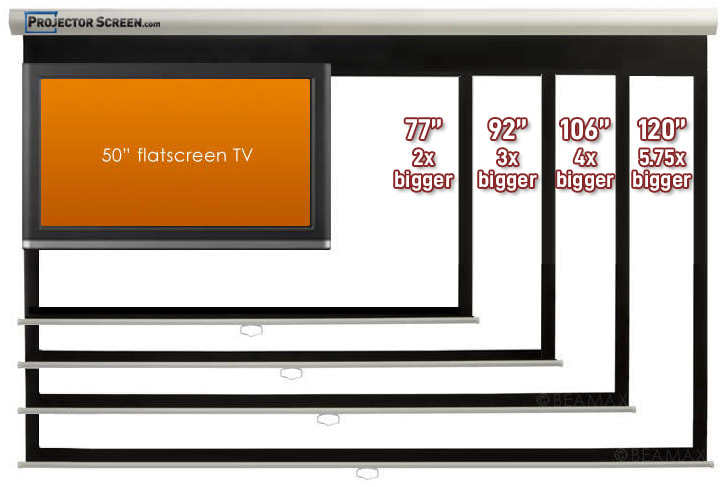
Online projection calculator tools are useful. Input your screen dimensions. The tool calculates for you. Check if it’s right. These tools help with projector settings. They’re easy to use. Give them a try.
Credit: www.projectorscreen.com
Determining Screen Dimensions
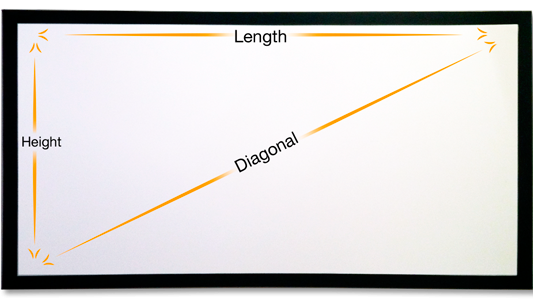
Use a tape measure for screen width. Measure from one edge to the other. Keep the tape straight. This gives the true width of the screen. Double-check for accuracy. It’s important. A correct width ensures proper fitting.
Screen height is easy to measure. Start at the bottom edge. Measure up to the top edge. Use a tape measure. Make sure it’s straight. This gives the exact height. Accurate height helps in setting up the projector.
Diagonal is the most common measurement. Measure from one corner to the opposite corner. Use a tape measure. Keep it straight and taut. This gives the diagonal size. Diagonal size is used in screen specifications. It’s crucial for setup.
Understanding Aspect Ratios
Aspect ratios are numbers that show screen shapes. 4:3 and 16:9 are popular. The first number is width. The second is height. A 4:3 screen looks like a square. A 16:9 screen is like a rectangle. Movies often use 16:9. Older TV shows use 4:3. Choose the right one for your projector. It makes watching better.
Screen size changes with aspect ratio. 16:9 gives a wider view. 4:3 shows more height. A 100-inch screen with 16:9 is wider than 100-inch 4:3. Measure carefully. It helps fit the screen in your room. Pick an aspect ratio that suits your space. Right choice gives great viewing experience.
Adjusting For Room Size
The distance from the projector to the screen matters. It affects the picture size. A short distance means a smaller image. A longer distance gives a bigger image. Measure the room to decide the best spot. Keep the projector steady. Ensure the picture is clear and sharp.
Sit at the right distance from the screen. Not too close, not too far. A common rule is 1.5 times the screen width. This keeps the image clear. You see every detail. If the screen is 80 inches wide, sit 120 inches away. This helps your eyes stay relaxed.
Calculating Optimal Screen Size
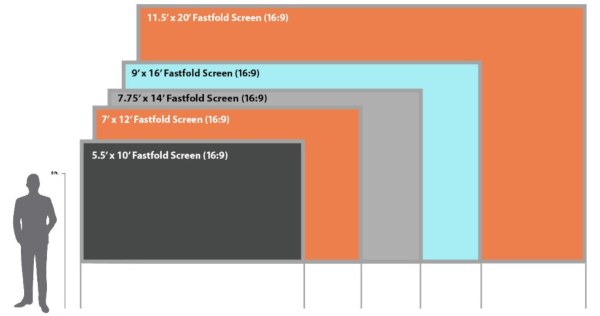
Measure the length and width of the room. This helps find the right screen size. The screen should be big enough to see easily. But it should not be too big. Everyone in the room should see the whole screen. Measure the distance from the screen to the farthest seat. This distance is important. It helps decide the best screen size.
Check the projector’s throw ratio. This tells how far the projector should be from the screen. A higher ratio means more distance. A lower ratio means less distance. The projector’s brightness affects screen size too. Brighter projectors can handle bigger screens. But remember, a too big screen may look dim. Always check your projector’s manual for details.
Credit: meetingtomorrow.com
Tips For Accurate Measurement
Rechecking measurementsis very important. Always measure twice. Measuring twice helps avoid errors. Use a tape measure for best results. Keep the tape straight and flat. Don’t let it bend or twist. This ensures accurate readings. Compare your results. Double-check with a friend. Two pairs of eyes see better than one.
Watch out for common measurement mistakes. People often forget the screen border. Measure the visible area only. Avoid measuring the frame or stand. This can cause wrong readings. Make sure the projector is off. Light can affect measurements. Keep the room dark if needed. Write down your measurements. This prevents forgetting them later.
Credit: ssidisplays.com
Frequently Asked Questions
How Do I Calculate Projector Screen Size?
To calculate projector screen size, measure the diagonal from one corner to the opposite. Use a measuring tape for accuracy. This measurement determines the screen’s size, typically given in inches. Understanding this size helps in choosing the right screen for your space and enhancing your viewing experience.
What Is The Standard Projector Screen Size?
Standard projector screen sizes vary, with 100 inches being common for home theaters. Business presentations often use smaller screens, around 60 to 80 inches. Your choice depends on room size, projector capabilities, and audience needs. Always check your projector’s specifications to match it with an appropriate screen size.
How Does Aspect Ratio Affect Screen Size?
Aspect ratio affects screen size by determining the width-to-height relationship. Common ratios include 16:9 for widescreen and 4:3 for traditional formats. Choose an aspect ratio that matches your content and projector specifications. This ensures optimal viewing and prevents image distortion, providing a better visual experience.
Can I Change Projector Screen Size Easily?
Yes, you can change projector screen size by adjusting the zoom or moving the projector. Use the zoom function to enlarge or reduce the image. Alternatively, repositioning the projector closer or further from the screen can also alter the size.
Always ensure the focus remains sharp for clarity.
Conclusion
Measuring your projector screen size doesn’t have to be hard. Start by assessing your room’s dimensions. Choose a screen size that fits your space comfortably. Use a measuring tape for accuracy. Check the distance from projector to screen. This ensures optimal viewing.
Remember, bigger isn’t always better. Consider seating arrangements. Ensure everyone can see clearly. Balance screen size with room size. This creates a great viewing experience. With these tips, measuring becomes simple. You’ll enjoy your movies or presentations more. Perfect screen size leads to better enjoyment.
Now, you’re ready to measure and enjoy!

Everett Ashford is an electrical engineer and expert in electronics reviews, tips, and troubleshooting. Specializing in audio and sound devices, including earbuds, AirPods, and headphones, he brings in-depth knowledge and practical advice to help consumers make informed decisions.