How to Reset a Ge Dishwasher: Quick and Easy Steps
Is your GE dishwasher acting up or stuck mid-cycle? You’re not alone, and the good news is that a simple reset could fix the problem fast.
Knowing how to reset your GE dishwasher can save you time, frustration, and even a service call. In this guide, you’ll discover easy, step-by-step instructions to get your dishwasher running smoothly again. Keep reading—you’re just moments away from turning your dishwasher troubles into a thing of the past.

Credit: www.youtube.com
Preparation Steps
Before resetting a GE dishwasher, prepare carefully. Proper preparation avoids mistakes and keeps you safe. Follow these steps to get ready for the reset process.
Gather Necessary Tools
Collect tools needed for the reset. Usually, no special tools are required, but keep these items handy:
- Soft cloth or towel
- Flathead screwdriver
- Owner’s manual for reference
- Flashlight for better visibility
Having these ready helps you work smoothly and efficiently.
Ensure Safety Precautions
Safety is important before any repair or reset. Follow these precautions:
- Unplug the dishwasher from power outlet
- Turn off water supply to the dishwasher
- Wear dry clothes and avoid wet hands
- Clear the area around the dishwasher
These steps prevent accidents and protect your dishwasher.
Locate The Reset Button
Locating the reset button on your GE dishwasher is a crucial step when you need to troubleshoot or restart the appliance. Knowing exactly where to find this button saves you time and prevents unnecessary frustration. Let’s break down how to spot it quickly and easily.
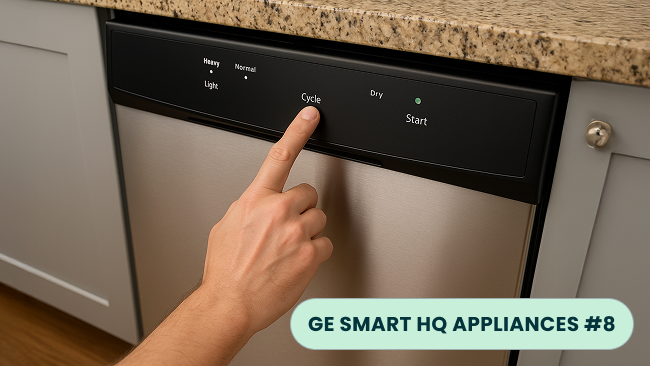
Check The Control Panel
The control panel is the most common place to find the reset button. It’s usually on the front of the dishwasher, near the top edge of the door or just above the door handle.
Look closely at the buttons and display area. The reset button might be labeled simply as “Reset,” or it might be integrated with other controls like “Cancel” or “Start/Reset.” Sometimes it’s a small, recessed button that requires a pen or a paperclip to press.
Have you ever had to press multiple buttons before realizing that the reset function was hidden behind another label? This happens more often than you think, so don’t give up if it’s not immediately obvious.
Identify Button Symbols
Not all reset buttons say “Reset.” Some use symbols or abbreviations that can confuse you. Common symbols might include a circular arrow, a triangle, or a small square.
Check your dishwasher’s user manual if you have it handy. It usually contains a diagram of the control panel and explains what each symbol means. If you don’t have the manual, online resources or GE’s website can be a helpful backup.
Remember, pressing the wrong button can interrupt your cycle or cause unexpected behavior. Are you certain what each button does? Taking a moment to identify symbols prevents mistakes and helps you reset your dishwasher confidently.
Perform A Manual Reset
Performing a manual reset on your GE dishwasher can often resolve minor glitches that stop it from working properly. This process helps clear any temporary errors and can get your machine back to running smoothly without the need for professional help. It’s simple, quick, and something you can do right at home.
Turn Off The Power Supply
Start by cutting off the dishwasher’s power source. You can do this by either unplugging the unit or switching off the circuit breaker that controls it. This step is crucial because it ensures your safety and allows the dishwasher’s system to fully shut down.
Have you ever thought about how many appliances just need a simple restart like a computer? Turning off the power gives the dishwasher’s control board a chance to reset any error codes stored in its memory.
Wait And Reconnect
After turning off the power, wait for at least 5 minutes before reconnecting it. This pause allows all internal components to discharge and reset properly. Resist the urge to rush this step; a full reset depends on giving the dishwasher enough time.
Once the wait is over, plug the dishwasher back in or flip the circuit breaker back on. Then, try running a cycle to see if the reset fixed the issue. If the dishwasher still doesn’t respond, the problem might be more complex, but this manual reset often solves common hiccups.
Credit: appworkco.com
Using The Control Panel
Using the control panel to reset your GE dishwasher is a straightforward way to solve many common issues. This method gives you direct access to the machine’s settings and lets you clear errors without needing tools or technical help. Knowing how to navigate the control panel can save you time and prevent frustration.
Select The Appropriate Reset Option
Look closely at your dishwasher’s control panel. Different models may have slightly different reset buttons or sequences.
- Check for a button labeled “Reset,” “Cancel,” or “Drain.”
- Some models require you to press and hold the button for a few seconds.
- If your panel has a digital display, look for an option related to resetting or clearing errors.
Choosing the right reset option is crucial. Pressing the wrong button might not clear the issue or could start an unwanted cycle. Have you ever pressed buttons randomly, hoping to fix a problem? Taking a moment to understand your panel can prevent that trial and error.
Follow Display Instructions
Once you select the reset option, pay attention to the control panel’s display. It often guides you through the next steps.
- The display might show messages like “Resetting,” “Please wait,” or “Cycle cancelled.”
- Follow any prompts exactly to ensure the reset completes correctly.
- If the display shows an error code, note it down before resetting—it can help with troubleshooting later.
Sometimes the dishwasher may pause or beep during the reset process. Don’t interrupt it by opening the door or pressing other buttons. Have you noticed how patience can sometimes be the key to fixing these appliances? Letting the machine finish its reset cycle often solves the problem without extra effort.
Troubleshooting Common Issues
Troubleshooting common issues with your GE dishwasher can save time and avoid unnecessary repairs. Many problems can be fixed with a simple reset or basic checks. Knowing what to do helps you keep your dishwasher running smoothly.
Start by identifying the issue clearly. Some problems show up as error codes on the display. Others involve power or mechanical faults. This section guides you through fixing frequent problems step-by-step.
Address Persistent Error Codes
Error codes signal specific problems in your dishwasher. Check the user manual or GE’s website for code meanings. Common codes include:
- E1 – Water supply issue
- E2 – Drain problem
- E3 – Heating error
Reset the dishwasher by turning it off and unplugging it for a few minutes. Plug it back in and start a new cycle. If the code returns, check the related parts:
- Inspect water inlet valve for blockages.
- Clear the drain hose and filter.
- Ensure the heating element is intact.
Cleaning filters and removing debris helps prevent many errors. Sometimes, running a diagnostic mode reveals hidden faults.
Resolve Power Supply Problems
A dishwasher without power won’t start or respond. Check the power source first:
- Make sure the plug is fully inserted.
- Check the circuit breaker; reset if tripped.
- Test the outlet with another device.
Inspect the door latch. The dishwasher won’t run if the door is not securely closed. Replace the latch if broken.
Look for damaged power cords or loose wiring inside the machine. Avoid running the dishwasher with faulty cables.
Power issues often cause error codes or no response. Fixing electrical problems restores normal function.
When To Seek Professional Help
Knowing when to seek professional help is key to keeping your GE dishwasher working well. Some problems need expert care beyond a simple reset. Understanding the signs can save time and prevent damage.
Identify Complex Technical Issues
Some dishwasher problems look simple but are complex inside. Strange noises, water leaks, or error codes mean deeper issues. Faulty wiring, broken sensors, or motor problems need special tools. Avoid trying to fix these yourself. Incorrect repairs can cause more damage or safety risks.
Consider Warranty And Service Options
Check if your dishwasher is still under warranty. Repairs by unauthorized technicians may void it. Use authorized GE service centers for repairs and parts. Professional service ensures quality work and protects your investment. Also, some issues require specific parts only experts can provide.

Credit: theappliancecarecompany.com
Frequently Asked Questions
How Do I Reset My Ge Dishwasher Easily?
To reset a GE dishwasher, press the “Start/Reset” button for 3 seconds. The dishwasher will drain and reset. Wait a few minutes before restarting the cycle.
Why Does My Ge Dishwasher Need A Reset?
A reset fixes minor glitches like unresponsive buttons or stuck cycles. It clears errors and restores normal operation without service calls.
Can I Reset A Ge Dishwasher Without Unplugging It?
Yes, most GE dishwashers reset via the control panel by holding “Start/Reset. ” Unplugging is optional but sometimes helps with stubborn errors.
How Long Does A Ge Dishwasher Reset Take?
A typical reset drains water and clears errors in about 2-3 minutes. After that, the dishwasher is ready to start a new cycle.
Conclusion
Resetting your GE dishwasher can fix many common issues. Follow the steps carefully to avoid mistakes. A quick reset often restores normal function. Regular maintenance helps keep your dishwasher working well. Small problems don’t always need a technician’s help. Try resetting before calling for repairs.
Keep your dishwasher running smoothly with simple care. You can handle this task easily at home. Saves time and money. A working dishwasher makes kitchen chores easier every day.

Jaxon Wilder is a tech enthusiast and contributor at ElectroDoz, where he dives into the latest trends in electronics and smart gadgets. With a sharp eye for innovation and hands-on testing, Jaxon brings readers practical reviews, tips, and insights on everything from everyday tech accessories to advanced devices. His goal is to make technology simpler, smarter, and more enjoyable for everyone.