Why Do My Airpods Keep Cutting Out? Uncover Solutions
Have you ever been in the middle of your favorite song or an important phone call, only to have your AirPods suddenly cut out? If you find yourself nodding in frustration, you’re not alone.
This common issue can be incredibly annoying and disrupt your daily routine. But why do your AirPods keep cutting out? The answer might be simpler than you think. By understanding what’s causing the problem, you can take steps to fix it and enjoy uninterrupted audio bliss.
Stay with us as we unravel the mystery behind those pesky interruptions and help you get back to seamless listening.
Common Causes Of Airpods Connectivity Issues
Bluetooth signals can face interference. Devices nearby might cause trouble. Walls and metal objects also interfere. Keep AirPods away from such things. This helps in reducing signal issues.
Low battery can cause sound problems. AirPods need enough power to work well. Charge them often. This ensures they have enough battery. Regular charging avoids cutting out issues.
Old software may cause connectivity issues. Always update your devices. Updates fix bugs and improve performance. Make sure your AirPods are up to date. Check for updates regularly.
Distance affects connectivity. AirPods work best when close to the device. Stay within a good range for best sound. Keep the device nearby for clear audio. Too much distance can cause sound to cut out.

Credit: www.wikihow.com
Troubleshooting Steps
To fix AirPods, start by resetting them. Press the button on the case. Hold it for 15 seconds. Watch for the light to change. This clears old settings. Your AirPods are like new again.
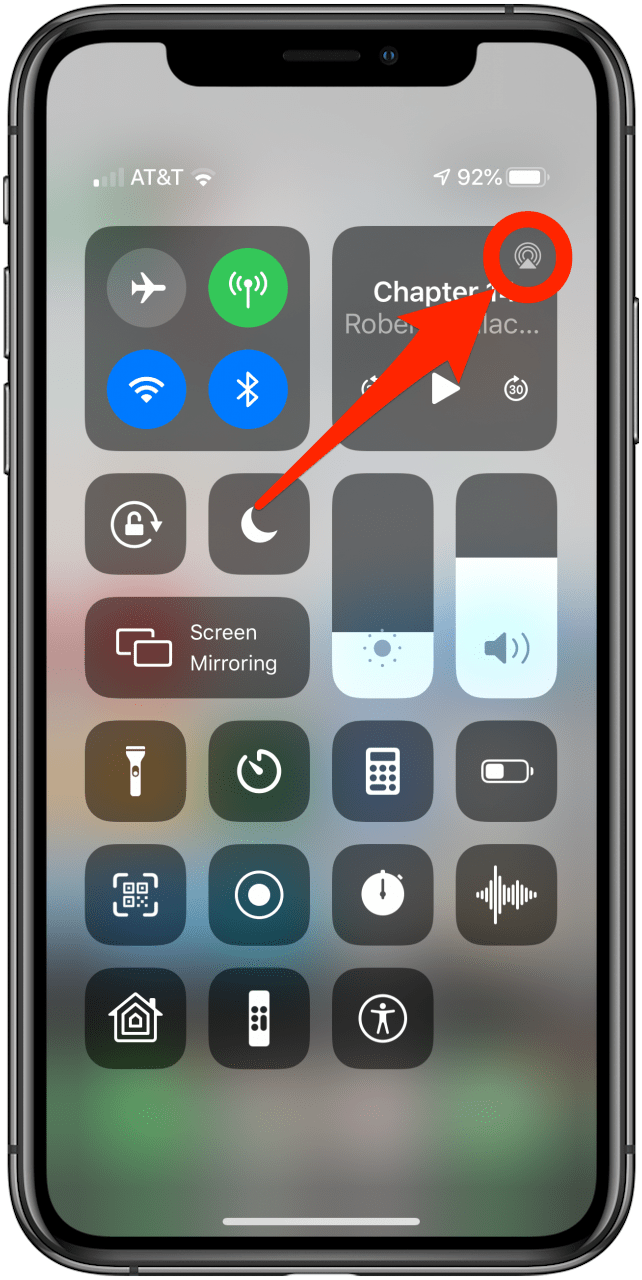
After resetting, reconnect the AirPods. Open the case near your device. Go to Bluetooth settings. Tap on your AirPods name. This sets up a fresh connection. It should improve sound quality.
Check for updates on your phone. Updates fix many bugs. Go to settings and look for updates. Install any new updates. Updated software helps AirPods work better.
Low battery causes sound issues. Always check battery level. Charge AirPods and their case. Make sure both have enough power. Full battery ensures smooth sound.
Advanced Solutions
Resetting Network Settingscan help fix Airpods issues. Go to your phone’s settings. Find the “Reset” option. Choose “Reset Network Settings.” This clears old connections. It can make your Airpods work better.
Adjusting Audio Balancecan improve sound. Open the audio settings on your device. Look for “Audio Balance.” Move the slider to even the sound. This helps if one Airpod is louder than the other.
Exploring Device Compatibilityis important. Check if your device is up-to-date. Airpods work best with updated software. If your device is old, it might cause problems. Consider using a newer device.
Consulting Apple Supportcan solve tricky issues. Visit the Apple website. Look for support options. You can chat with experts. They know how to fix Airpod problems. Sometimes, they might suggest replacing your Airpods.
Credit: www.iphonelife.com
Preventive Measures
Keep your Airpods software up-to-date. Updates fix bugs and improve connection. Check for updates often. Use your iPhone or iPad to update. Follow simple steps in settings. Updates make Airpods work better.
Keep Airpods away from other electronics. Avoid places with many signals. Interference can cause sound issues. Stay away from microwaves and Wi-Fi routers. Use Airpods in quiet areas. This helps keep the sound clear.
Charge your Airpods regularly. Low batterycan cause sound problems. Don’t let batteries run out. Use the charging case often. Keep Airpods charged when not in use. This keeps them working well.
Store Airpods in their case. Cases protect them from damage. Keep them away from water and dirt. Safe storagekeeps them clean and working. Use the case to avoid losing them. Proper storage helps Airpods last longer.
Alternative Devices
Wireless earbuds are popular now. They help us listen to music easily. Many brands make these earbuds. Each brand has something special. Some are very small. Others have long battery life. Sound quality is important too. You can choose based on your needs.
Sound quality is a big deal. Clear sound makes music fun. Some earbuds have deep bass. Others have clear highs. Check which sound you like. Brands differ in this. Try different earbuds to see. Everyone likes different sounds.
Price matters when buying earbuds. Some are cheap. Others cost a lot. Expensive ones have many features. Like noise canceling or long battery. Cheap ones may have fewer features. Decide what you need most. Balance price and features.
User reviews help us choose. People share their experiences. They tell us if earbuds are good. Check for common issues. See what people like most. Reviews can save you from bad buys. Always read reviews before you decide.
Credit: www.iphonelife.com
Frequently Asked Questions
Why Do Airpods Lose Connection Frequently?
AirPods may lose connection due to Bluetooth interference, outdated firmware, or low battery. Ensure your AirPods and device are within range. Check for software updates and avoid areas with heavy wireless traffic to minimize disruptions.
How Can I Fix Airpods Cutting Out?
To fix AirPods cutting out, try resetting them. Place them in the case and hold the setup button. Ensure your device’s Bluetooth is on and updated. Sometimes disconnecting and reconnecting solves connectivity issues.
Do Airpods Cut Out When Battery Is Low?
Yes, AirPods can cut out when battery levels are low. Ensure they are sufficiently charged before use. Low battery can cause connectivity issues and audio interruptions.
Can Wi-fi Affect Airpods Connection?
Wi-Fi can interfere with AirPods if the frequencies overlap. Reduce interference by moving away from crowded wireless networks. Ensure your device uses the latest software to optimize connectivity.
Conclusion
Experiencing AirPods cutting out can be frustrating. Several factors cause this issue. Wireless interference often disrupts the connection. Low battery can also lead to interruptions. Make sure your AirPods are fully charged. Updating software on your device helps too. Regular cleaning of AirPods ensures better performance.
Check your device’s Bluetooth settings. Sometimes, a quick reset solves the problem. These tips improve your listening experience. Feel free to experiment and find what works best. Enjoy seamless audio without interruptions. Happy listening!

Everett Ashford is an electrical engineer and expert in electronics reviews, tips, and troubleshooting. Specializing in audio and sound devices, including earbuds, AirPods, and headphones, he brings in-depth knowledge and practical advice to help consumers make informed decisions.