

How to Pair Smartwatch to iPhone: Quick and Easy Guide
Imagine having the power to manage your daily tasks, fitness goals, and notifications right from your wrist. Pairing your smartwatch to your iPhone can transform how you interact with technology, making your life more convenient and efficient.
You might feel a bit overwhelmed thinking about syncing these gadgets, but don’t worry—it’s simpler than you think. We’ll guide you through the steps to ensure a seamless connection, so you can start enjoying the benefits of this dynamic duo.
Let’s eliminate the frustration and unlock the potential of your devices together. Are you ready to discover how your smartwatch and iPhone can create a smarter, more connected you?
Compatibility Check
Not all smartwatches work with iPhones. Check your watch’s manual. It tells you if it’s compatible. Apple Watches work best with iPhones. Other brands may need apps. These apps help connect the watch to the phone.
Make sure your iPhone is updated. Use the latest iOS version. Older versions may not work well. Bluetooth must be on. This helps your phone find the watch. Both devices should be close together. This makes pairing easier.
Preparing Your Devices
Your smartwatch needs to be fully charged. Connect it to the charger. Ensure the charger is working. Watch the battery icon. It should show charging. Wait until the battery is full. Avoid starting the pairing process with a low battery. A full battery helps in smooth pairing.
Check your iPhone for software updates. Go to Settings. Tap on General. Select Software Update. Download any available updates. Install them. Confirm the update process. Restart your iPhone. This ensures compatibility with your smartwatch. A fresh update prevents pairing issues.
Activating Bluetooth
Find the Settingsapp on your iPhone. Tap it. Scroll to find Bluetooth. Tap on Bluetooth. Make sure it’s turned on. If it’s off, tap the switch. It should turn green. This means Bluetooth is active. Now, your iPhone can connect.
Turn on your smartwatch. Open its settings. Look for Bluetooth option. Tap it. Make sure Bluetooth is enabled. Some watches have a switch. Slide it to turn on. You might see a Bluetooth symbol. This means your watch is ready. Now, it’s time to connect to your iPhone.
Pairing Process
Open your smartwatch appon the iPhone. Make sure the Bluetooth is on. The app will search for the smartwatch. It will show it on the screen. Tap the connect buttonto start pairing. The smartwatch and iPhone will sync. Follow prompts to finish the setup. Check the watch screen for any messages. Make sure the connection is stable. Your smartwatch is now ready to use. Check notifications on the watch. Enjoy the features it offers.
Go to your iPhone’s settings. Open the Bluetooth menu. Turn it on if off. Find your smartwatch in the list. Tap on the watch name. Wait for them to connect. Look for any messages on the watch. Ensure the connection is stable. Your watch is now paired. Explore settings and features. Test notifications on your watch. Enjoy using your smartwatch.
Troubleshooting Common Issues
Pairing your smartwatch with an iPhone involves simple steps. Ensure Bluetooth is enabled on both devices. Use the Watch app on your iPhone to connect. Follow on-screen instructions for a seamless setup.
Connection Problems
Many people face connection problemswith their smartwatches. First, check if Bluetoothis turned on. Ensure the smartwatch is within close rangeof the iPhone. Sometimes, restarting both devices can solve the issue. If the problem persists, try unpairing and then pair again. This can refresh the connection.
Software Compatibility
Software issues can prevent pairing. Ensure the smartwatch software is up-to-date. Check if the iPhone has the latest iOS version. Some smartwatches may not be compatible with older iPhone models. Verify the compatibility on the manufacturer’s website. If updates are available, install them to enhance compatibility.
Customizing Your Smartwatch
Pick which notificationsyou want on your smartwatch. Open the app on your iPhone. Go to the notifications section. Choose the apps you want alerts from. It’s easy to do. Just tap on the apps you like. You can get alerts for messages, calls, and more. Make sure the settings are saved. Now, your watch will beep or buzz for those alerts.
Change how your watch screen looks. Start with the brightness. Make it brighter or dimmer. Find the display section in the app. You can also pick a clock face. There are many styles to choose from. Some show numbers, others show pictures. Tap to pick your favorite. Save your choices. Now, your watch looks just how you like it.
Exploring Features
Smartwatches offer great health and fitness trackingfeatures. They count your steps and track your heart rate. These devices can also monitor sleep patterns. You can use them to set daily fitness goals. Some even remind you to move if you sit too long. This helps you stay active and healthy. You can sync data with your phone. This way, you can see your progress over time. It makes getting fit easier and fun.
Using voice commandson your smartwatch is easy. You can ask it to make calls. It can send messages with just your voice. You can set reminders or alarms, too. This is useful when your hands are busy. Some watches can control music playback. It’s simple to change songs or volume without touching your phone. Voice controls make using your smartwatch convenient. It’s like having a helper on your wrist.
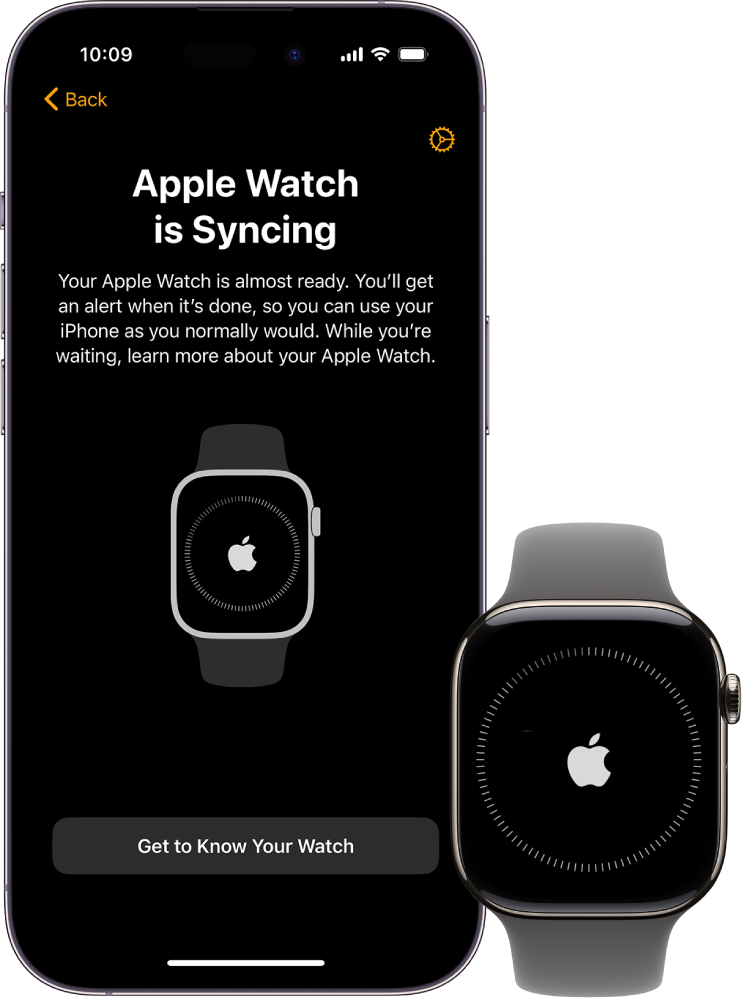
Credit: support.apple.com

Credit: www.youtube.com
Frequently Asked Questions
How Do I Connect My Smartwatch To My Iphone?
To connect your smartwatch to your iPhone, first ensure Bluetooth is enabled on your iPhone. Open the Watch app on your iPhone and follow the on-screen instructions to pair your devices. Make sure your smartwatch is in pairing mode for a successful connection.
Why Won’t My Smartwatch Pair With My Iphone?
If your smartwatch won’t pair, ensure it’s in pairing mode and Bluetooth is enabled on your iPhone. Restart both devices and try again. Check for software updates on both your iPhone and smartwatch. Ensure they are compatible with each other before attempting to pair.
How To Troubleshoot Pairing Issues With Smartwatch?
To troubleshoot pairing issues, first restart both your smartwatch and iPhone. Ensure Bluetooth is enabled on your iPhone. Make sure the smartwatch is in pairing mode. Check for software updates on both devices. If issues persist, consult the user manual or contact customer support.
Can I Pair Any Smartwatch With My Iphone?
Not all smartwatches are compatible with iPhones. Check the smartwatch’s specifications for compatibility with iOS devices. Most major brands like Apple Watch, Samsung Galaxy Watch, and Fitbit offer compatibility with iPhones. Ensure the smartwatch supports the necessary apps for full functionality.
Conclusion
Pairing your smartwatch with an iPhone is simple. Follow the steps carefully. Ensure your devices are compatible. Keep Bluetooth enabled on both devices. Download the necessary apps. They help with the connection process. Each smartwatch may have specific requirements. Check your model’s instructions.
Troubleshooting may be needed sometimes. Patience is key. Once paired, enjoy new features. Track fitness goals or receive notifications. Your smartwatch becomes a helpful tool. Stay connected with ease. An integrated experience makes life smoother. Enjoy exploring new functionalities. Simplify daily tasks and stay organized.
Embrace the convenience of technology.

Finnian Delaney is a seasoned writer and editor specializing in technology and electronics. At ElectroDoz, he covers a wide range of topics, with a focus on MacBooks, laptops, fitness trackers, keyboards, and computer hardware. With a knack for making complex tech accessible, Finnian helps readers stay informed and confident when choosing their next device or upgrade.


