Does Respondus Lockdown Browser Use Webcam? Explained
Have you ever felt that nervous anticipation before an online exam? You’re not alone.
As exams shift to virtual platforms, maintaining the integrity of these tests becomes a top priority. That’s where tools like Respondus LockDown Browser come into play. But what about the role of webcams? Do they add an extra layer of security, or are they just another piece of technology to navigate?
Imagine sitting down for your test, knowing that every move you make could be monitored. It’s a thought that can either reassure you or make you feel uneasy. Understanding whether Respondus LockDown Browser uses a webcam can be crucial for your peace of mind and your preparation strategy. We’ll explore how this software works, whether it requires a webcam, and what that means for you. Stay with us, because the insights you gain might just change how you approach your next online exam.
Credit: web.respondus.com
What Is Respondus Lockdown Browser?
Respondus Lockdown Browser is a special web browser. It helps students take tests online. This browser stops cheating during tests. It does not let students open other tabs. They cannot copy questions or visit other websites. This makes the test fair for everyone.
Schools use this tool to make sure students are honest. It also can use a webcam. This is called Respondus Monitor. It watches students while they take the test. The webcam records them to ensure they do not cheat. This makes the test environment very secure.
Many schools trust this browser. It is easy to use. Students just need to install it on their computers. Then they can start their test without worries.
How Respondus Lockdown Browser Works
Respondus Lockdown Browser is a special web browserfor tests. It stops students from cheating. Once you start, you can’t open other programs or browse the internet. This browser also hides printand copy functions. It even stops screenshots. The interface is simple and easy for everyone. It is secure and safe to use. Schools trust it for online exams.
The browser works on Windowsand Maccomputers. It is also available for iPads. Make sure your device has the latest version. Updates help the browser run smoothly. The app is not available for Android devices. Some features may vary by platform. Always check requirements before installing.
Webcam Integration With Respondus
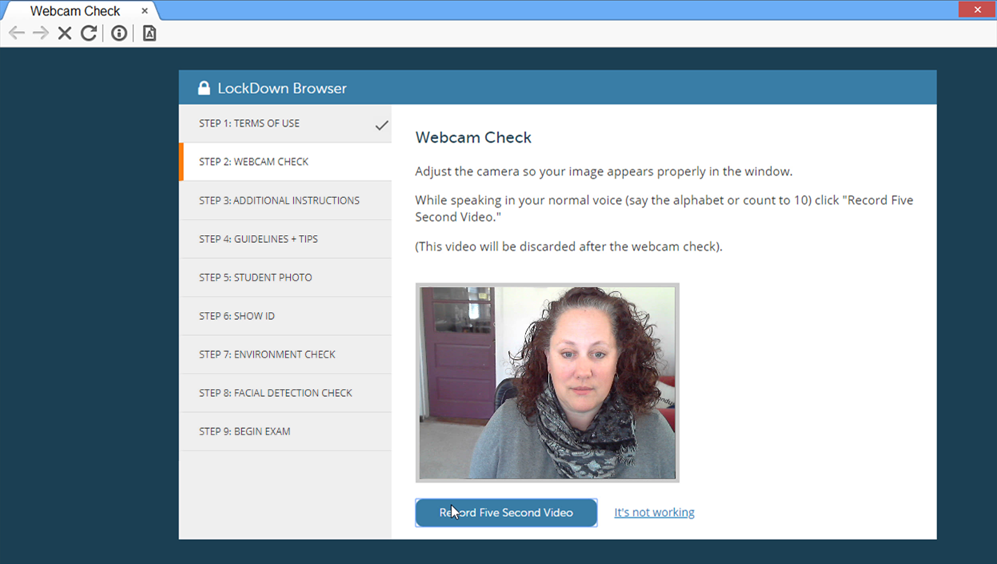
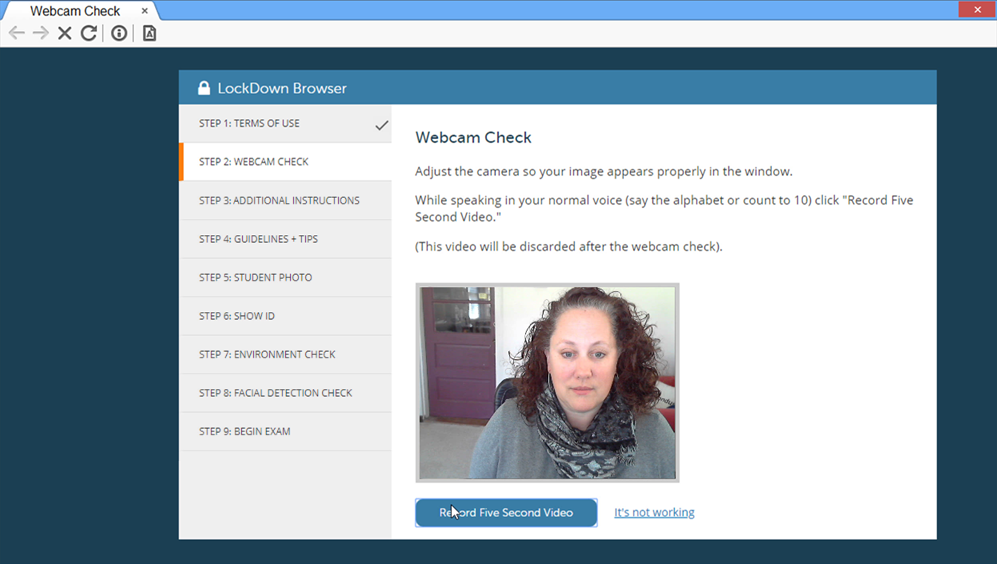
The webcam in Respondus helps to monitor students. It ensures they follow rules during a test. The camera records the student’s face and actions. This helps to keep the test fair.
For the webcam to work, a computer must have a built-in camera or a connected one. The room should have good lighting. This helps the camera see clearly. Make sure the camera is not blocked. The computer must have enough battery or be plugged in. These steps ensure the webcam works well.
Credit: goodwin.libguides.com
Setting Up Webcam For Exams
First, download the Respondus Lockdown Browserfrom the official site. Follow the on-screen prompts to install. Ensure the webcam is connectedto your computer. Open the browser and check for the webcam setup option. Click it and follow the instructions. Test the webcam to ensure it works. Adjust the camera anglefor a clear view.
Sometimes the webcam might not work. Check if it’s properly connected. Restart the computer if needed. Make sure no other app is using the webcam. Close other programs and try again. Update the webcam driver if there are still issues. Use the help featurein the browser for more tips.
Privacy Concerns
Data security measuresare crucial with Respondus Lockdown Browser. This tool uses a webcam to monitor users. It ensures test integrity but raises concerns. People worry about their data being safe. Respondus promises strong security protocols. It encrypts data to keep it safe from hackers. Encryption makes data unreadable to outsiders. This is important for user privacy. Respondus follows strict guidelines for data handling. These guidelines protect sensitive information. Users should understand how their data is stored and used.
User privacy protectionis a top priority. Respondus takes steps to safeguard user data. It does not store video recordings for long periods. Recordings are deleted after exams. This limits exposure of personal information. Users can feel more secure knowing their data won’t be misused. Privacy policies are clear and accessible. They explain how the webcam data is managed. This transparency helps build trust with users. Respondus aims to keep personal data safe and private.
Credit: blogs.vcu.edu
Benefits Of Using Webcam With Lockdown Browser
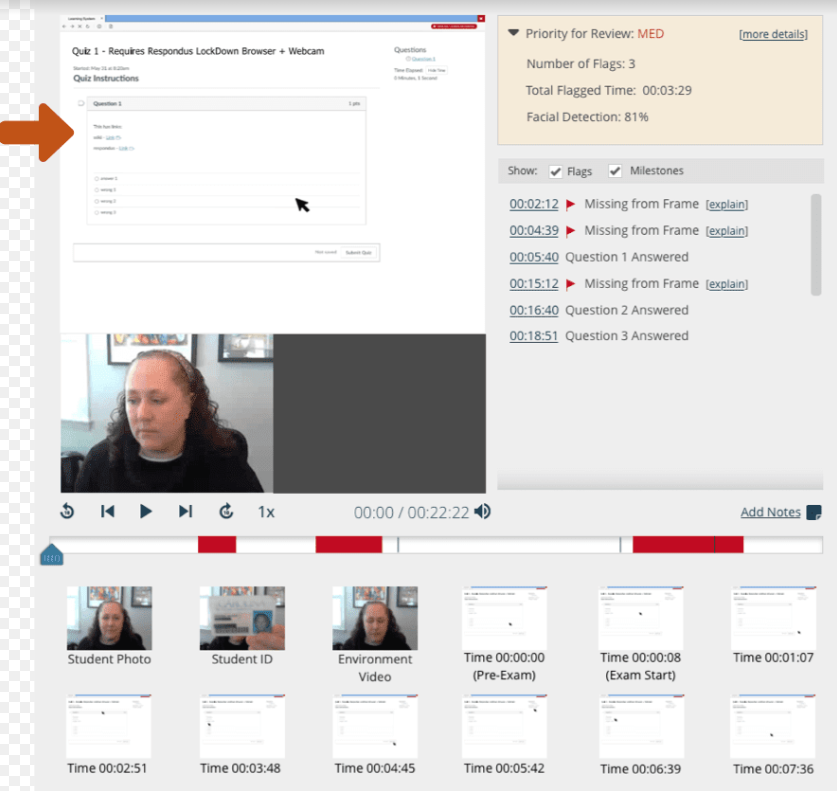
The webcam helps keep exams safe. It watches the student during the test. This stops cheating. Teachers can see if students look away. They can check if someone else enters the room. This keeps the test fair. It makes sure students follow the rules. It also records the session. Teachers can review it later if needed.
Using a webcam makes tests honest. Students know they are watched. This makes them try hard to be honest. It builds trust between students and teachers. Students learn to respect the test rules. It helps keep the value of their grades. Everyone gets a fair chance to show their skills. This keeps the school proud of its students. It encourages true learning.
Challenges And Limitations
Many students face technical difficultieswith the Respondus Lockdown Browser. Computers may freeze or run slowly. This can cause stress during tests. Some students have old computers. These computers may not support the browser well.
Internet connection is another issue. Weak connections can interrupt exams. This makes students lose time. The browser may also have bugs. These bugs can stop webcams from working.
Students often feel nervoususing this browser. They worry about privacy. A webcam watches them during the exam. This can feel uncomfortable. Some students feel anxious about being watched.
The software can be confusing to use. Students might not know how to fix problems. This adds to their stress. Some may not know where to find help. This can make their experience worse.
Alternatives To Respondus Lockdown Browser
Respondus Lockdown Browser uses a webcam to monitor students during exams. Some alternatives include Proctorio, Examity, and Honorlock. These tools also offer features like webcam monitoring and secure testing environments.
Comparison With Other Tools
Some tools are easy to use. Others might need training. Many have different features. Some tools offer better compatibility. Others may be more affordable. Compare tools carefully.
Pros And Cons Of Alternatives
Pros include flexibility and cost-effectiveness. Some tools work well with old computers. Others have great support. Cons may involve limited features. Some tools might lack security. Others can be hard to learn.
Frequently Asked Questions
Does Lockdown Browser Need A Webcam?
Yes, Respondus Lockdown Browser typically requires a webcam for proctoring. The webcam is used to monitor students during exams, ensuring academic integrity. It’s crucial for preventing cheating by recording the test-taking environment and student actions. Always check specific test requirements as some exams might not require a webcam.
How Does Webcam Enhance Security?
The webcam enhances security by recording students during exams. It captures video and audio to prevent cheating. This footage is reviewed by instructors or proctors to ensure compliance with exam rules. The continuous monitoring deters dishonest behavior and maintains the integrity of the test process.
Can Lockdown Browser Access My Webcam?
Yes, Respondus Lockdown Browser accesses your webcam for proctoring purposes. It activates the webcam to monitor and record during exams. This ensures compliance with test rules by capturing video and audio. It’s a necessary feature for maintaining the integrity of online assessments.
Is Webcam Use Mandatory For All Exams?
Webcam use in Respondus Lockdown Browser is not mandatory for all exams. It depends on the instructor’s requirements. Some exams might not need a webcam if they do not require video monitoring. Always check specific exam instructions to know if a webcam is required.
Conclusion
The Respondus Lockdown Browser offers a secure testing environment. It often uses a webcam for monitoring. This feature helps maintain academic integrity. Students should ensure their webcam works correctly. Privacy concerns are understandable. Institutions must address these transparently. The browser’s technology aims to prevent cheating.
It creates a fair testing space for everyone. Understanding its functions can ease concerns. Students and educators can benefit from its features. The tool remains a reliable solution for online exams. Always follow guidelines for the best experience.

Callen Ridgeway is a senior writer at ElectroDoz, where he shares his expertise on the latest in drones, webcams, cameras, and a wide range of cutting-edge electronic devices. With a passion for exploring emerging tech and breaking it down into practical insights, Callen helps readers make smarter choices when it comes to gadgets and gear. When he’s not testing the newest electronics, he’s busy keeping up with the innovations shaping the future of consumer technology.