What is the Insert Key on a 60 Keyboard: Explained
Have you ever found yourself puzzled by the absence of certain keys on your 60% keyboard? One of the most commonly missed keys is the Insert key.
If you’ve been wondering what the Insert key is and why it’s missing from your compact keyboard, you’re not alone. This elusive key might seem like a small detail, but understanding its purpose can enhance your typing experience and productivity.
Imagine navigating your computer with more ease and efficiency. As you delve into the world of 60% keyboards, learning about the Insert key could be the missing piece to optimizing your workflow. By the end of this article, not only will you know what the Insert key is, but you’ll also discover how to work around its absence. Stay with us, and unlock the secrets of your 60% keyboard.

Credit: www.youtube.com
Insert Key Functionality
The Insert Keychanges how text gets typed. When you press it, it switches between two modes: Insertand Overwrite. Insert mode adds new letters. Overwrite mode replaces old letters. This key helps you choose how you want to edit text.
Writers and editors often use the Insert Key. In Insert mode, you can add words without removing old text. In Overwrite mode, you can fix mistakes quickly. This key makes text editing easierand faster. Many find it helpful for correcting errors in documents.
60% Keyboard Layout
A 60% keyboard is smaller than a full-size keyboard. It lacks the number pad and function keys. This makes it compact and easy to carry. It’s great for small desks.
Full-size keyboards have more keys. They include a number pad, arrow keys, and function keys. 60% keyboards remove these for a smaller size. This means fewer keys to press. But you can still type fast.
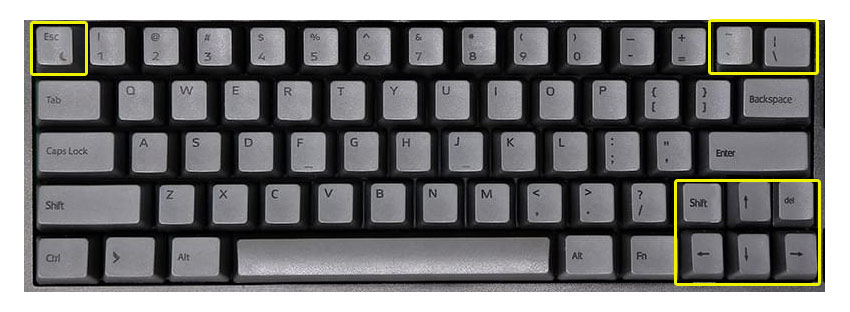
Finding keys can be tricky on a 60% keyboard. Some keys are in different spots. Function keys might need a special key combo. This can take practice to remember. But many people like the small design.
Accessing Insert On 60% Keyboards
60% keyboards are compact and lack certain keys. One missing key is the Insertkey. To use Insert, you must press combination keys. Usually, this involves the Fn keyand another key. Commonly, it’s Fn + Por Fn + I.
Some users prefer software solutions. Programs can help map keys. AutoHotkeyis a popular choice. It lets you create custom shortcuts. Another option is using keyboard software. Many brands offer this. You can remap keys to include Insert. This makes typing easier and faster.
Credit: www.daskeyboard.com
User Experience
A 60 keyboard is small and easy to carry. It fits well in small spaces. The Insert key is missing, which can be a problem for some. Without it, copy-paste tasks might take longer.
Some users love the simple design. Others miss the extra keys. It’s lighter, making it easy to move. But it may not be good for everyone.
Typing on a 60 keyboard can be fast. Fewer keys mean less hand movement. This can help with typing speed. But missing keys can slow you down. Tasks like editing text can become tricky.
Learning new shortcuts is needed. This can take some time. Some people enjoy this challenge. Others find it hard.
Alternatives To Insert Key
Many 60% keyboards do not have an Insert Key. External keyboards can be a solution. These keyboards often have more keys. They include the Insert Key. Plug it into your computer. Use it for tasks needing the Insert Key.
Custom key mapping changes how keys work. Use software like AutoHotkey. Remap a key to act like the Insert Key. This helps when you need the Insert Key. It is easy to do. Follow simple steps in the software. Enjoy your new key function!

Credit: superuser.com
Frequently Asked Questions
What Does The Insert Key Do On A 60% Keyboard?
The Insert key on a 60% keyboard is often absent due to space constraints. Its function, which is to toggle between insert and overwrite modes in text editing, can be accessed using keyboard shortcuts or through remapping software like AutoHotkey or the keyboard’s firmware.
How To Access Insert Key Function On A 60% Keyboard?
Access the Insert key function on a 60% keyboard by using shortcuts or remapping keys. Programs like AutoHotkey allow custom shortcuts. Keyboard firmware might offer built-in options to access missing keys’ functionalities, including the Insert key.
Is Insert Key Necessary On Compact Keyboards?
The Insert key is not essential on compact keyboards for most users. Many modern applications and workflows do not rely heavily on its function. Its absence can be substituted with shortcuts, making room for other keys or features on compact keyboards.
Can I Remap Insert Key On A 60% Keyboard?
Yes, you can remap the Insert key function on a 60% keyboard using software or firmware. Programs like AutoHotkey provide flexibility to assign the Insert function to another key. This customization offers convenience for those who frequently use the Insert feature.
Conclusion
Understanding the Insert key on a 60% keyboard is helpful. It allows efficient editing and navigation. By knowing its function, users can improve productivity. Many compact keyboards lack this key. Alternatives exist, like shortcuts or customized settings. Exploring these options can enhance your typing experience.
Always check your keyboard’s manual. It may offer specific guidance for your model. Remember, practice makes perfect. Experiment with different setups. Find what works best for you. A well-optimized keyboard setup can save time. It ensures smooth operation and comfort.
Happy typing!

Finnian Delaney is a seasoned writer and editor specializing in technology and electronics. At ElectroDoz, he covers a wide range of topics, with a focus on MacBooks, laptops, fitness trackers, keyboards, and computer hardware. With a knack for making complex tech accessible, Finnian helps readers stay informed and confident when choosing their next device or upgrade.