How to Set Time on Fitpro Smartwatch?
Are you struggling to set the time on your Fitpro Smartwatch? You’re not alone.
Many users find themselves tangled in settings, wondering why something so simple seems so complicated. Imagine the relief of having your watch display the correct time effortlessly. By the end of this guide, you’ll master the art of setting the time on your Fitpro Smartwatch, making it a breeze every time.
We’ll walk you through each step, ensuring you feel confident and in control. Ready to make your smartwatch work for you? Let’s dive in and solve this once and for all.
-960x960.png)
Credit: virtualmaqazin.com
Getting Started With Fitpro Smartwatch
Carefully open the box. Find your Fitpro Smartwatch inside. Remove all packaging materials. Check for the watch, charger, and manual. Make sure nothing is missing. Read the manual for important instructions. Keep the box for safe storage. Inspect your watch for any damages. Hold the watch in your hand. Feel its sleek design.
Locate the charging cable. Connect the cable to the watch. Plug the cable into a power source. Watch the battery icon on the screen. It shows charging progress. Full charge takes about two hours. Avoid overcharging. Unplug the charger after charging. Keep your watch charged for best performance.
Connecting Fitpro Smartwatch To Your Smartphone
First, go to the app store on your phone. Search for Fitpro App. Tap to download it. Wait for the app to install. Open the app after installation. Follow the on-screen steps. These help you set up your account. The app is easy to use. It guides you step by step.
Make sure your smartwatch is charged. Open the Fitpro Appon your phone. Turn on Bluetooth in your phone settings. Your smartwatch should be nearby. Tap on ‘Pair Device’ in the app. It will search for devices. Your watch name will appear. Tap to connect it. Wait for the pairing to complete. Now your watch is connected. You can set the time easily.
Navigating Fitpro Smartwatch Settings
Find the home screenon your Fitpro smartwatch. Look for the gear icon. This icon leads you to the Settings Menu. Tap the icon to access it. Explore the options available there. Each option helps you customize the watch. Change settings as needed.
Fitpro smartwatch offers many key features. Check the time and datesettings. Adjust them to match your local time. Look at the display settings. Brightness can be changed here. Sound settings let you adjust volume. Health tracking features are very useful. Monitor your steps and heart rate. Keep track of your daily activities.
Manual Time Adjustment
Press the power button to wake the screen. Swipe left until you find the settings icon. Tap on it. Look for the time settings option. Tap to open it. Use the arrows to set the correct time. Confirm your changes by pressing the save button. It’s simple and quick.
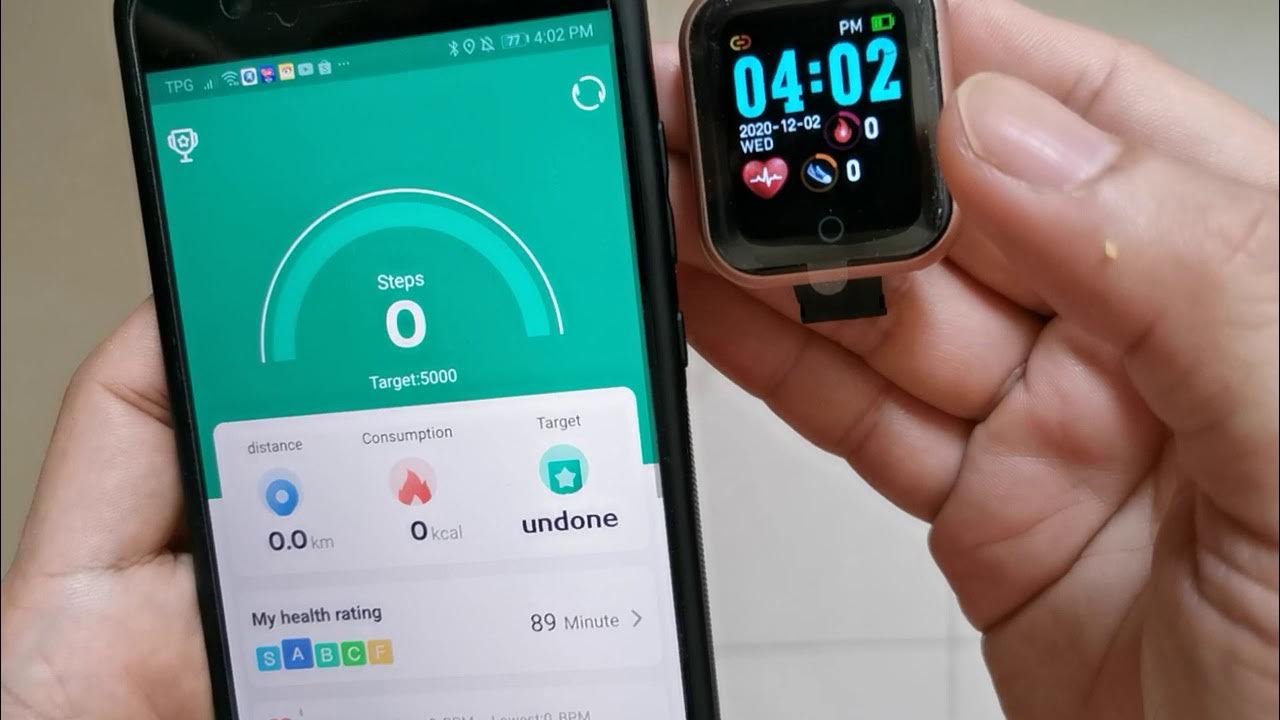
Connect your smartwatch to your smartphone. Open the Fitpro app on your phone. Go to the device settings section. Find the option to sync time. Tap to sync the smartwatch with your phone. This ensures accurate time. Your watch will automatically update. Easy and efficient.
Troubleshooting Common Issues
Setting the time on a Fitpro Smartwatch can be tricky. Ensure the app is updated and sync your watch with your smartphone for accurate time settings. Follow the instructions in the user manual if issues persist.
Resetting The Smartwatch
Resetting the Fitpro smartwatch can solve many issues. First, press the power button. Hold it until the screen goes black. This action resets the device. After that, wait a few seconds. Then, turn the smartwatch back on. Check if the problems are fixed. If issues persist, try resetting again.
Handling Sync Problems
Sync problems are common with Fitpro smartwatches. First, ensure Bluetooth is on. Check if your phone is nearby. Close other apps that use Bluetooth. Open the Fitpro app on your phone. Tap “Sync Device” for connection. If it fails, try restarting both devices. Ensure the app is updated. If syncing still does not work, reinstall the app.
Credit: www.youtube.com
Advanced Tips For Fitpro Smartwatch
Change your watch face for a new look. Go to settings. Choose Watch Face. Pick a style you like. Some faces show more than time. They can show steps, heart rate, and more. You can change them often. It keeps your watch fun. Try different colors too.
Fitpro has many cool features. Use the fitness tracker for steps. Check your heart rate with a tap. The sleep monitor helps you rest better. There is also a stopwatch. Perfect for timing games or runs. Use the weather app to plan your day. Explore these features for more fun.
Frequently Asked Questions
How Do I Adjust Time On Fitpro Smartwatch?
To adjust the time, access the settings menu on your Fitpro smartwatch. Navigate to “Date & Time” and select “Set Time. ” Use the touchscreen or buttons to change the time. Confirm your selection to save changes. Ensure your smartwatch is connected to your smartphone for automatic updates.
Can I Sync Fitpro Watch With My Phone?
Yes, you can sync your Fitpro smartwatch with your smartphone. Download the Fitpro app from your device’s app store. Enable Bluetooth on both devices. Open the app and follow the pairing instructions. Once connected, the smartwatch will automatically update its time settings based on your phone.
Why Is My Fitpro Time Incorrect?
If your Fitpro smartwatch displays incorrect time, check the Bluetooth connection with your smartphone. Ensure the smartwatch is paired with the Fitpro app. Verify your phone’s time settings are accurate. Restart both devices if needed. This should resolve any time discrepancies on your smartwatch.
How Often Should I Update Fitpro Time Settings?
Updating Fitpro time settings regularly ensures accuracy. It’s best to sync your smartwatch with your phone daily. This allows automatic adjustments based on your phone’s time zone settings. Regular updates keep your watch functioning correctly, especially when traveling across different time zones.
Conclusion
Setting the time on your Fitpro Smartwatch is now easy. Follow the steps provided to ensure accurate timekeeping. A properly set watch helps manage your schedule better. It also enhances the smartwatch’s functionality. Remember to check the time settings regularly.
This ensures your watch stays updated. Reliable time management is crucial for daily tasks. With practice, adjusting settings becomes quick and simple. Enjoy the benefits of a perfectly set Fitpro Smartwatch. Stay on time, stay organized. Your smartwatch is now ready to assist you throughout the day.

Finnian Delaney is a seasoned writer and editor specializing in technology and electronics. At ElectroDoz, he covers a wide range of topics, with a focus on MacBooks, laptops, fitness trackers, keyboards, and computer hardware. With a knack for making complex tech accessible, Finnian helps readers stay informed and confident when choosing their next device or upgrade.